
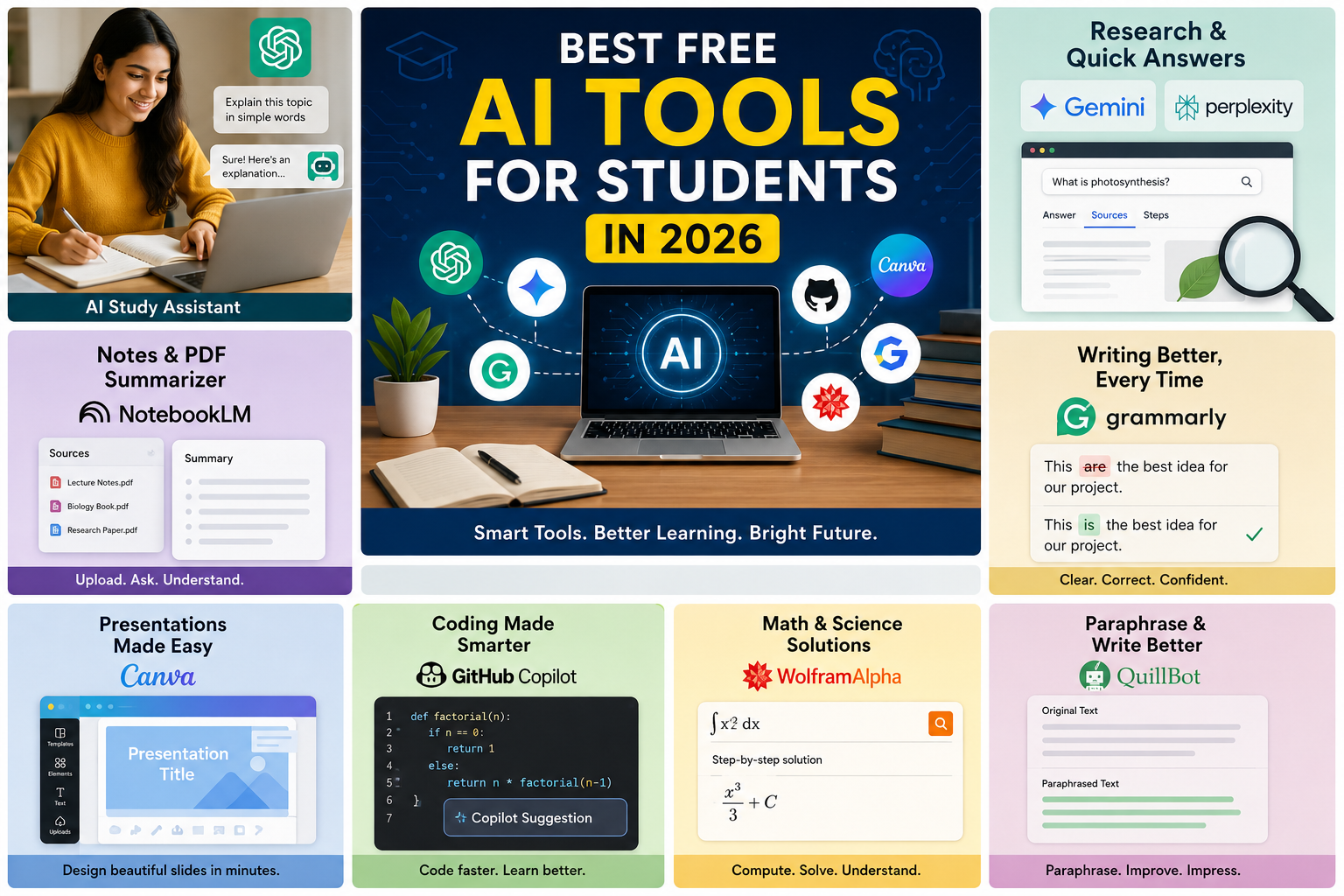
AI is no longer just something used by tech companies. In 2026, students can use AI tools for studying, research, writing, presentations, coding, note-taking, exam preparation, and even career planning. Best free AI tools for students in 2026 can help with studying, research, writing, coding, presentations and exam preparation.
The good news is that you do not need to subscribe to several expensive AI services. Many of the best AI tools for students offer useful free plans, while some provide additional benefits through student programs. The important thing is choosing the right tool for the right task instead of using one AI chatbot for everything.
In this guide, we have listed the best free AI tools for students in 2026, what each tool is best at, how students can use it, and where its free version makes the most sense.
Quick answer: For most students, ChatGPT is a great all-purpose study assistant, NotebookLM is excellent for working with your own notes and PDFs, Perplexity is useful for research with sources, Gemini is a strong general-purpose option, and tools such as Grammarly, Canva and GitHub Copilot can help with writing, presentations and coding.
Best Free AI Tools for Students in 2026
Here are some of the most useful AI tools students can try in 2026:
| AI Tool | Best For | Free Option | Link |
|---|---|---|---|
| ChatGPT | Studying, explanations and practice | Yes | https://chat.openai.com |
| Google Gemini | Research, writing and general help | Yes | https://gemini.google.com |
| NotebookLM | Notes, PDFs and revision | Yes | https://notebooklm.google.com |
| Perplexity | Research and source discovery | Yes | https://www.perplexity.ai |
| Claude | Writing and long-form analysis | Yes | https://claude.ai |
| Grammarly | Grammar and writing improvement | Yes | https://www.grammarly.com |
| Canva | Presentations and designs | Yes | https://www.canva.com |
| GitHub Copilot | Coding and programming | Student/free options | https://github.com/features/copilot |
| Wolfram Alpha | Maths and science | Free features | https://www.wolframalpha.com |
| QuillBot | Paraphrasing and writing improvement | Free features | https://quillbot.com |
Free limits and student offers can change, so students should check the current plan before relying on a specific feature.
ChatGPT – Best All-Purpose AI Tool for Students
Best for: Studying, explanations, brainstorming, practice questions, writing assistance and problem-solving.
ChatGPT is one of the most flexible AI tools a student can use. Instead of simply asking for an answer, students can use it like a personal tutor.
For example, you can ask it to explain a difficult topic in simple language, create practice questions, test you before an exam, or identify where you made a mistake in a solution.
ChatGPT also has a Study Mode designed specifically around learning. It can guide students through concepts, ask questions, provide step-by-step help and create practice material rather than simply giving the final answer.
More details: https://help.openai.com/en/articles/11780217-chatgpt-study-mode-faq
How students can use ChatGPT
- Explain difficult topics in simple language
- Create revision notes
- Generate mock-test questions
- Practice interview questions
- Understand programming concepts
- Brainstorm assignment ideas
- Improve grammar and sentence structure
- Create study schedules
- Turn a topic into flashcards
- Get step-by-step help with problems
Best way to use ChatGPT for studying
Instead of saying:
“Give me the answer to this question.”
Try:
“Teach me how to solve this problem step by step. Ask me questions before giving me the final answer.”
That approach makes AI a learning assistant rather than a shortcut.
Google Gemini – Best for Research and Google Users
Best for: Research, brainstorming, writing, document-related tasks and general study assistance.
Google Gemini is another strong option for students who want an AI assistant for everyday academic work.
It can help explain concepts, brainstorm project ideas, summarize information and assist with writing. Students who already use Google’s ecosystem may also find Gemini convenient for workflows involving Google services.
Official site: https://gemini.google.com
How students can use Gemini
- Understand difficult concepts
- Brainstorm project topics
- Summarize information
- Create study questions
- Improve drafts
- Generate ideas for presentations
- Compare different concepts
- Work with text and other supported content
Who should use Gemini?
Gemini is particularly useful if you already rely heavily on Google products and want an AI assistant that fits naturally into that workflow.
As with other AI tools, students should verify important academic facts rather than assuming every generated answer is correct.
NotebookLM – Best Free AI Tool for Notes and PDFs
Best for: Lecture notes, textbooks, PDFs, research papers and exam revision.
NotebookLM is one of the most useful AI tools for students because it focuses on information you provide.
Instead of asking a general chatbot about an entire subject, you can give NotebookLM your study material and use it to explore that material.
Official link: https://notebooklm.google.com
How students can use NotebookLM
You can use it to:
- Summarize lecture notes
- Ask questions about a PDF
- Find important points in study material
- Create revision questions
- Understand complicated sections
- Organize research material
- Review several sources together
- Prepare for exams from your own documents
Why NotebookLM is different
A normal AI chatbot may answer from its general knowledge. NotebookLM is particularly useful when your question is based on specific documents you have provided.
For example, instead of asking:
“Explain this entire subject.”
you can upload your lecture material and ask:
“Explain the three most important concepts from these notes that are likely to appear in an exam.”
That makes the tool much more practical for focused revision.
Perplexity – Best Free AI Tool for Research
Best for: Web research, fact-finding and discovering sources.
Perplexity is useful when you need to research a topic and want to see supporting sources alongside the answer.
Official site: https://www.perplexity.ai
This can save time compared with opening many search results individually. However, students should still open the original sources and verify important information before using it in an assignment.
How students can use Perplexity
- Research assignment topics
- Find relevant sources
- Understand current events
- Compare different viewpoints
- Find statistics
- Start literature research
- Fact-check information
- Discover websites and papers for further reading
Important research tip
Do not copy an AI-generated answer directly into an academic assignment.
Instead:
AI answer → open sources → verify facts → read original material → write in your own words
This process gives you both speed and better understanding.
Claude – Best for Writing and Long Documents
Best for: Writing assistance, brainstorming, document analysis and detailed explanations.
Official site: https://claude.ai
Claude can be useful when students need help working through longer pieces of text or improving the structure of their writing.
It can help you understand a reading, organize an essay, brainstorm arguments and improve clarity.
How students can use Claude
- Brainstorm essay ideas
- Create essay outlines
- Analyze long text
- Improve writing clarity
- Explain difficult passages
- Review drafts
- Generate discussion questions
- Practice presentations
A better way to use AI for essays
Rather than asking AI to write the complete assignment, give it your own ideas and ask it to help organize them.
For example:
“Here are my three arguments. Help me create a logical essay structure and tell me where my reasoning is weak.”
This provides more educational value than simply generating an essay.
Grammarly – Best for Grammar and Writing Improvement
Best for: Grammar, spelling, clarity and polishing written work.
Official site: https://www.grammarly.com
Students often have good ideas but struggle to communicate them clearly. Grammarly can help identify common grammar and writing issues.
It can be useful for essays, emails, applications, reports and other academic writing.
How students can use Grammarly
- Check grammar
- Find spelling mistakes
- Improve sentence clarity
- Make writing more concise
- Review professional emails
- Polish scholarship applications
- Improve resumes
- Check writing before submission
Grammarly tip for students
Write your first draft yourself.
Then use an AI writing assistant to identify errors and improve clarity. This helps you retain your own voice instead of submitting something that sounds completely machine-generated.
Canva – Best AI Tool for Student Presentations
Best for: Presentations, posters, infographics and visual projects.
Official site: https://www.canva.com
A good presentation is not only about the information. How that information is presented also matters.
Canva can help students create presentation slides, posters, diagrams and other visual materials without requiring advanced graphic-design skills.
How students can use Canva
- Create presentation slides
- Design project posters
- Create infographics
- Make educational diagrams
- Create social-media graphics for college projects
- Build visual summaries
- Design resumes and portfolios
Presentation tip
Do not put an entire essay on your slides.
Use short points, useful visuals and clear headings. Your presentation should support what you are saying rather than replace it.
GitHub Copilot – Best AI Tool for Coding Students
Best for: Programming, debugging, code explanations and software projects.
Official page: https://github.com/features/copilot
For computer science and engineering students, AI coding assistants can make learning programming more interactive.
GitHub Copilot can help students understand code, generate coding suggestions and troubleshoot programming problems. Verified students may also have access to student-specific benefits through GitHub’s education programs.
How coding students can use GitHub Copilot
- Understand unfamiliar code
- Generate small code examples
- Find programming errors
- Refactor code
- Learn new programming concepts
- Create test cases
- Explore different approaches to a problem
- Build small academic projects
Don’t let AI do all your coding
If AI writes the code, ask it to explain every important part.
A good learning workflow is:
Write → test → find the error → ask AI for guidance → understand the fix → improve the code
This is much more valuable than copying code you cannot explain.
Wolfram Alpha – Best for Maths and Science
Best for: Mathematics, equations, calculations and scientific problems.
Official site: https://www.wolframalpha.com
Students studying mathematics, physics, engineering and other STEM subjects may find Wolfram Alpha useful for calculations and mathematical exploration.
It can help students check calculations and explore mathematical concepts.
How students can use Wolfram Alpha
- Check mathematical calculations
- Explore equations
- Work with graphs
- Verify answers
- Study mathematical concepts
- Practice STEM problems
Use it as a verification tool
If you are learning mathematics, don’t immediately enter every homework question and copy the result.
First attempt the problem yourself, then use a computational tool to check your work and understand where you went wrong.
QuillBot – Useful for Rewriting and Summarizing
Best for: Paraphrasing, summarizing and improving written text.
Official site: https://quillbot.com
QuillBot can be useful when you have already written something and want to improve readability or create a shorter version.
How students can use QuillBot
- Shorten paragraphs
- Improve sentence structure
- Summarize notes
- Find alternative wording
- Improve readability
- Rewrite your own draft
Use paraphrasing tools carefully
Paraphrasing does not automatically make copied material your own.
If you use information from another source, understand the source, cite it when required and write the explanation in your own voice.
Best Free AI Tools for Different Student Needs
There is no single AI tool that is perfect for every student.
The better approach is to choose a tool based on the task.
| Student Need | Recommended Tool |
| General study help | ChatGPT |
| Learning from PDFs | NotebookLM |
| Web research | Perplexity |
| General AI assistance | Gemini |
| Long-form writing help | Claude |
| Grammar checking | Grammarly |
| Presentations | Canva |
| Coding | GitHub Copilot |
| Maths and science | Wolfram Alpha |
| Paraphrasing | QuillBot |
Best Free AI Tool for Exam Preparation
For exam preparation, you do not necessarily need ten different AI tools.
A simple combination can be enough.
For understanding concepts
Use ChatGPT or Gemini to explain difficult topics.
For studying your own material
Use NotebookLM with your lecture notes, PDFs or other course material.
For practice
Ask an AI assistant to create questions based on the topics you have studied.
For example:
“Create 20 multiple-choice questions from these five topics. Do not show the answers until I respond.”
For research
Use Perplexity to find additional information and sources when your syllabus requires research beyond your notes.
Best Free AI Tools for College Assignments
AI can make assignments easier, but students should avoid turning the entire assignment into an AI-generated document.
A better workflow is:
Step 1: Research the topic
Use search engines, Perplexity, library resources and reliable websites to understand the topic.
Step 2: Create your own ideas
Write down the arguments, examples and points you want to include.
Step 3: Use AI as a helper
Ask ChatGPT, Gemini or Claude to help organize your ideas or identify gaps.
Step 4: Write the assignment
Use your own understanding and writing style.
Step 5: Proofread
Use Grammarly or another writing assistant to find grammar and clarity issues.
Step 6: Verify everything
Check facts, statistics, citations and references before submitting.
Best Free AI Tools for Students in India
Indian students can benefit from these tools across school, college and competitive-exam preparation.
For example:
- JEE and engineering: Wolfram Alpha, ChatGPT, NotebookLM and coding assistants
- NEET: ChatGPT, Gemini and NotebookLM for concept revision
- UPSC: Perplexity for research and NotebookLM for organizing study material
- College students: ChatGPT, Gemini, NotebookLM and Canva
- Computer science students: GitHub Copilot, ChatGPT and Gemini
- MBA students: ChatGPT, Perplexity and Canva
Availability and free limits can vary by country, account and education program, so always check the current terms before depending on a student offer.
Are Free AI Tools Actually Free for Students?
Most major AI platforms use a freemium model.
That means the basic version is free, but certain advanced models, higher usage limits or premium features may require payment.
This is important because the word “free” does not always mean unlimited.
What students should check
Before signing up, look at:
- Daily or monthly usage limits
- File-upload limits
- Available AI models
- Student verification requirements
- Premium features
- Whether a credit card is required
- Whether the offer is available in your country
A free plan can still be extremely useful if it covers the tasks you actually need.
How to Use AI Without Hurting Your Learning
The biggest mistake students can make is using AI as a replacement for learning.
AI is most useful when it helps you understand something that you could not understand on your own.
Use AI as a tutor
Ask it to explain difficult topics, give examples and test your knowledge.
Ask for hints before answers
If you are solving a problem, ask for a hint first.
This forces you to think before seeing the solution.
Verify important information
AI can make mistakes. Always verify important academic facts using textbooks, official sources, papers or trusted educational resources.
Don’t copy AI-generated assignments
Your university or school may have its own rules about AI use. Follow those rules and disclose AI assistance when required.
Protect personal information
Do not upload sensitive personal information, private documents or confidential academic material unless you understand how the platform handles your data.
A Simple Free AI Study Stack for Students
If you don’t want to install or subscribe to dozens of AI tools, start with a small toolkit.
For everyday studying
Use ChatGPT for explanations, practice questions and brainstorming.
For your own notes
Use NotebookLM to work with lecture notes and PDFs.
For research
Use Perplexity to discover sources and investigate topics.
For writing
Use Grammarly to improve grammar and clarity.
For presentations
Use Canva to create slides and visual material.
For coding
Use GitHub Copilot if you are learning programming and are eligible for its student benefits.
This combination covers most common student tasks without requiring a large collection of subscriptions.
Common Mistakes Students Make With AI Tools
AI can save time, but using it incorrectly can create new problems.
Using the first AI answer without checking it
AI-generated information can contain mistakes or outdated information.
Copying answers directly
Copying an AI response may prevent you from actually learning the subject.
Using AI for every small problem
Try solving a problem yourself first. Use AI when you genuinely need guidance.
Ignoring your school’s AI policy
Different institutions have different rules. Always check what is allowed for assignments, exams and research.
Trusting AI-generated references
If an AI tool provides a citation, open the source and make sure it actually supports the claim.
AI Tools to Summarize YouTube Videos: 10 Best Tools in 2026
Frequently Asked Questions
What is the best free AI tool for students in 2026?
There is no single best tool for everyone. ChatGPT is a strong all-purpose option, NotebookLM is excellent for studying from your own documents, and Perplexity is useful for research and discovering sources.
Which free AI tool is best for studying?
ChatGPT and NotebookLM are two strong choices. ChatGPT can act like an interactive tutor, while NotebookLM is particularly useful when you want to study from your own notes, PDFs and other course material.
Is ChatGPT free for students?
ChatGPT has a free option, although available features and usage limits can change over time. Students should check the current plan available to their account.
Is NotebookLM free?
NotebookLM offers a free version. Its limits and available features can change, so students should check the current Google NotebookLM plan before using it for heavy coursework.
Which AI tool is best for research?
Perplexity is a useful choice for research because it provides web-based answers with sources. However, students should always open and verify the original sources before citing information in academic work.
Which AI tool is best for coding students?
GitHub Copilot can be very useful for programming students, particularly for code suggestions, debugging and understanding code. ChatGPT and Gemini can also help explain programming concepts.
Can AI tools write my college assignment?
AI tools can help with brainstorming, research, outlining and editing, but students should follow their institution’s academic-integrity rules. Submitting AI-generated work as your own may violate those rules.
Can students use AI tools for exam preparation?
Yes. AI can be useful for creating practice questions, explaining concepts, generating flashcards and reviewing notes. It should be used as a study assistant rather than a replacement for learning.