
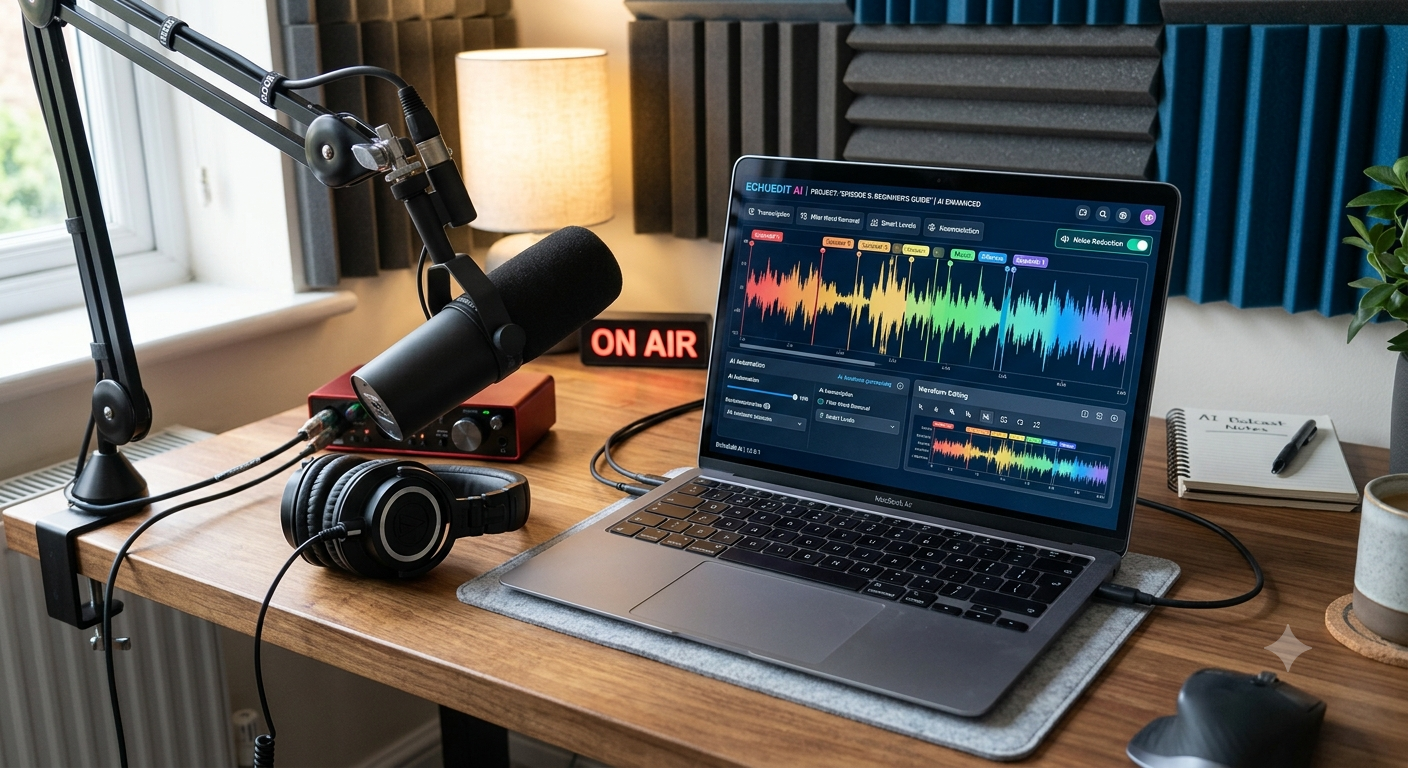
Starting a podcast is easier than ever, but editing can still feel complicated when you’re new to audio production. Removing background noise, cutting long pauses, fixing filler words, balancing voices, creating transcripts, and preparing clips for social media can take hours with traditional editing software.
That is where AI podcast editing tools can help.
In 2026, several AI-powered platforms can automate repetitive editing tasks while keeping the workflow simple enough for beginners. Tools such as Descript, Adobe Podcast, Riverside, Auphonic, and Cleanvoice can help creators clean recordings, remove unwanted sections, create transcripts, and prepare content without needing advanced audio-editing skills.
This guide covers the best AI podcast editing tools for beginners in 2026, what each tool does best, who should use it, and how to choose the right option for your podcast.
What Are AI Podcast Editing Tools?
AI podcast editing tools use artificial intelligence to automate common post-production tasks.
Instead of manually searching through a waveform for every “um,” pause, cough, or background noise, AI can identify many of these issues automatically.
Depending on the platform, AI podcast editors can help with:
- Removing filler words
- Removing long silences
- Reducing background noise
- Improving voice clarity
- Normalizing volume
- Creating transcripts
- Editing audio through text
- Creating podcast clips
- Adding captions
- Generating summaries and show notes
- Cleaning up remote interview recordings
For beginners, the biggest advantage is that you can spend less time learning complicated audio software and more time creating episodes.
Best AI Podcast Editing Tools for Beginners in 2026
Here are some of the strongest options to consider.
1. Descript
Descript is one of the easiest AI-powered editing platforms for beginners because it allows you to edit recordings through a transcript.
Instead of working exclusively with a traditional audio timeline, you can edit the transcript much like a document. Delete a sentence from the transcript and the corresponding part of the recording is removed.
Descript also provides AI-assisted features for removing filler words and background noise. Its current 2026 podcast software guide highlights transcript-based editing and AI-assisted cleanup as key parts of its workflow.
Best for: Beginners who want to edit podcasts by editing text.
Pros:
- Beginner-friendly interface
- Text-based editing
- AI-assisted cleanup
- Useful for audio and video podcasts
- Good workflow for repurposing content
Cons:
- Advanced audio production can still require a traditional editor
- Some features depend on the selected plan
Best choice for: YouTubers and podcasters who want one simple editing workflow.
2. Adobe Podcast
Adobe Podcast is particularly attractive to beginners because it works directly in the browser.
Its Enhance Speech technology can reduce background noise and improve speech clarity without requiring complicated audio-processing knowledge. Adobe also provides transcription-based editing, recording, captions, and other podcast tools.
Adobe’s current Enhance Speech v2 can handle difficult recordings with noise and echo, while its Studio workflow allows creators to edit audio and video more like a text document.
Best for: Beginners who mainly need clean, professional-sounding speech.
Pros:
- Browser-based
- Very easy to use
- Excellent speech enhancement
- No complicated DAW setup
- Transcription-based editing
- Useful for remote recordings
Cons:
- Less suitable for highly complex music production
- Some advanced features require Premium
Adobe’s current plan information shows that the free tier includes Enhance Speech and Studio features with usage limits, while Premium adds features such as longer processing, bulk uploads, enhancement controls, and additional Studio capabilities.
Best choice for: Beginners recording in bedrooms, home offices, cafés, or other less-than-perfect environments.
3. Riverside
Riverside is especially useful if you record podcasts with remote guests.
Its workflow combines recording and editing, and its editor can automate tasks such as removing background noise, cutting filler words, shortening silences, enhancing audio, and muting crosstalk.
Riverside also offers AI-powered Magic Clips, which can identify highlights from longer recordings and turn them into shareable short-form clips.
Best for: Video podcasts and remote interviews.
Pros:
- Recording and editing in one platform
- Useful for remote guests
- AI-powered editing
- Automatic captions
- Social media clips
- Separate audio and video tracks
Cons:
- More useful if you also want remote recording
- Advanced audio production may require another tool
Best choice for: Beginners who want to record interviews and create social media clips from the same episode.
4. Auphonic
Auphonic takes a slightly different approach.
Instead of being primarily a creative editor, Auphonic focuses heavily on automatic audio post-production.
It can analyze recordings and automate tasks such as loudness normalization, leveling, noise reduction, filtering, speech recognition, and other post-production processes.
Auphonic can also automatically process multiple tracks, although its documentation notes that multitrack processing is more advanced and beginners should generally start with its simpler single-track workflow.
Best for: Beginners who already have an edited recording and want automated audio cleanup.
Pros:
- Automatic loudness leveling
- Noise reduction
- Audio restoration
- Speech recognition
- Podcast-focused workflow
- Useful automation
Cons:
- Not the simplest choice for creative editing
- Multitrack features can be more complicated
Best choice for: Creators who want to upload an episode and let AI handle much of the audio processing.
5. Cleanvoice AI
Cleanvoice AI is designed specifically around removing unwanted elements from spoken recordings.
It can automatically remove filler words, long silences, mouth sounds, breathing sounds, stutters, and background noise. It also provides transcription, summaries, and social content features.
This makes it particularly interesting for beginners who don’t want to learn traditional audio-editing terminology.
Best for: Beginners who want automatic cleanup with minimal manual editing.
Pros:
- Simple workflow
- Removes filler words
- Removes long silences
- Removes mouth sounds
- Background-noise reduction
- Transcription and summaries
- Video podcast support
Cons:
- Less focused on detailed manual sound design
- AI edits should still be reviewed before publishing
Cleanvoice currently offers a free trial workflow and says users can clean up 30 minutes of audio or video for free.
Best choice for: First-time podcasters who want AI to handle repetitive cleanup.
AI Podcast Editing Tools Comparison
| Tool | Best For | Beginner Friendly | AI Cleanup | Transcription | Clips |
|---|---|---|---|---|---|
| Descript | Text-based editing | ⭐⭐⭐⭐⭐ | Yes | Yes | Yes |
| Adobe Podcast | Voice enhancement | ⭐⭐⭐⭐⭐ | Excellent | Yes | Yes |
| Riverside | Remote podcasts | ⭐⭐⭐⭐⭐ | Yes | Yes | Excellent |
| Auphonic | Audio post-production | ⭐⭐⭐⭐ | Excellent | Yes | Limited |
| Cleanvoice | Automatic cleanup | ⭐⭐⭐⭐⭐ | Excellent | Yes | Limited |
The “best” tool depends heavily on what you want to automate. For example, Adobe Podcast is particularly strong for speech enhancement, Riverside is useful for recording and repurposing remote content, while Auphonic focuses on automated post-production.
Which AI Podcast Editing Tool Is Best for Beginners?
There isn’t one perfect tool for everyone.
Your best option depends on your podcasting workflow.
Best Overall: Descript
Choose Descript if you want to edit your podcast almost like a text document.
It is especially useful for creators who are uncomfortable with traditional audio timelines.
Best for Audio Quality: Adobe Podcast
Choose Adobe Podcast if your biggest problem is poor recording quality, background noise, echo, or unclear speech.
Adobe’s Enhance Speech is designed specifically to improve spoken audio and can be used directly in a browser.
Best for Remote Interviews: Riverside
If your podcast includes guests from different locations, Riverside is a strong option because recording, editing, captions, and AI-assisted clip creation can be part of the same workflow.
Best for Automatic Audio Processing: Auphonic
Auphonic is a good option when you want automated loudness balancing, noise reduction, filtering, and other post-production tasks without manually adjusting every setting.
Best for Removing Filler Words: Cleanvoice
If your biggest editing problem is “um,” “uh,” long pauses, mouth sounds, breathing, or similar distractions, Cleanvoice is worth considering.
AI Podcast Editing vs Traditional DAWs
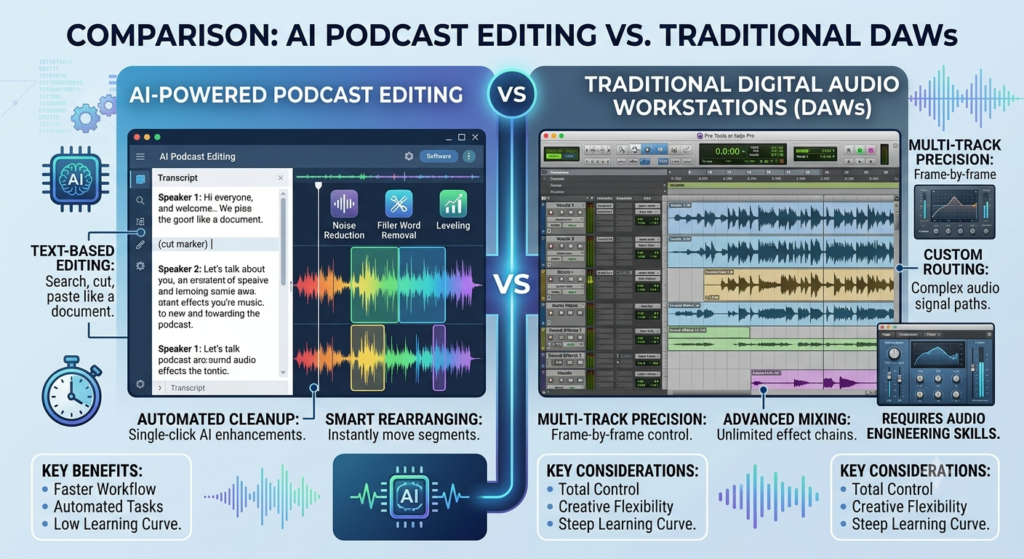
Traditional DAWs such as Audacity, Adobe Audition, Logic Pro, and other professional audio editors still have an important place in podcast production.
The biggest difference is automation versus control.
AI tools are generally easier for beginners because they automate repetitive tasks.
Traditional DAWs provide much more detailed control over tracks, effects, EQ, compression, automation, mixing, and sound design.
For a simple interview podcast, an AI editor may be enough.
For a highly produced show with music, sound effects, multiple tracks, and detailed mixing, a traditional DAW may still be the better choice.
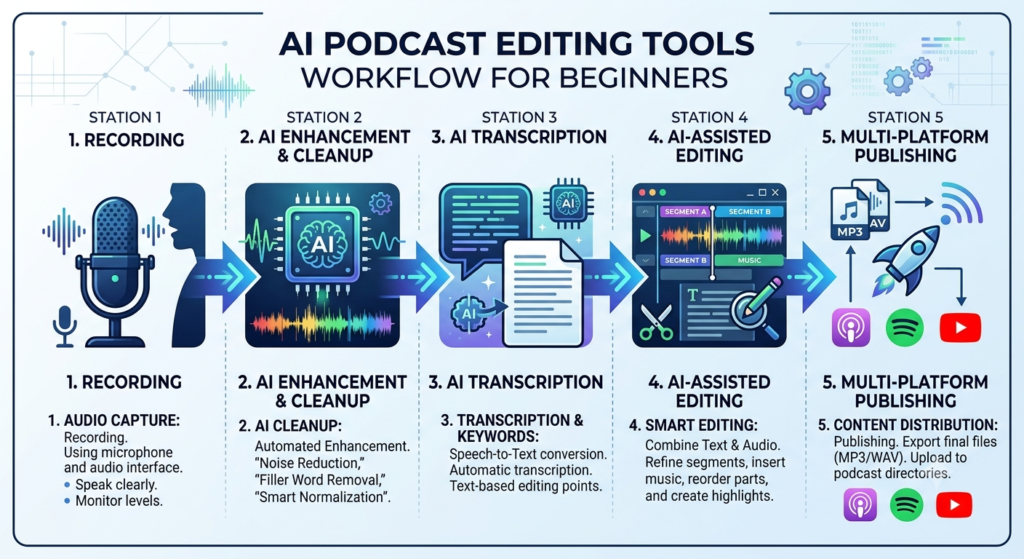
How to Edit a Podcast With AI
A beginner-friendly AI podcast workflow can look like this:
Step 1: Record Your Podcast
Use a decent microphone and record in the quietest environment possible.
AI can improve poor recordings, but it cannot completely replace good recording technique.
Step 2: Upload Your Recording
Choose an AI editing platform such as Descript, Adobe Podcast, Cleanvoice, Riverside, or Auphonic.
Step 3: Transcribe the Episode
If your selected platform supports transcription, let it generate a transcript.
This makes it easier to find sections of your episode without listening through the entire recording.
Step 4: Remove Unwanted Content
Use AI features to identify:
- Filler words
- Long pauses
- Repeated sentences
- Unwanted sounds
- Background noise
Always review the AI edits before exporting.
Step 5: Improve the Audio
Use AI enhancement or automatic post-production to improve speech clarity, balance volume, and reduce unwanted noise.
Adobe Podcast, for example, uses Enhance Speech to reduce background noise and improve voice clarity.
Step 6: Add Your Intro and Outro
Add your podcast intro, outro, music, or other branding elements.
Step 7: Create Short Clips
If you’re publishing video podcasts, use AI clip-generation features to identify interesting sections and turn them into social media content.
Riverside’s Magic Clips is one example of this workflow.
Step 8: Listen Before Publishing
Never publish an AI-edited episode without listening to the final version.
AI can occasionally remove something you wanted to keep or make an edit sound unnatural.
Can AI Completely Edit a Podcast?
For many simple podcasts, AI can automate a large portion of the repetitive editing work.
However, it doesn’t mean that every podcast can be produced with one click.
Human review is still important for:
- Story flow
- Timing
- Music selection
- Creative decisions
- Sound effects
- Emotional pacing
- Important dialogue
- Final quality control
The best approach for beginners is usually AI-assisted editing rather than completely hands-off editing.
Are AI Podcast Editing Tools Good for Beginners?
Yes.
In fact, beginners are among the people who can benefit most from AI podcast editing.
Traditional audio software can have a steep learning curve. You may need to understand waveforms, EQ, compression, noise gates, plugins, gain staging, and other concepts.
AI tools can automate many of those technical steps.
Adobe, for example, specifically describes Enhance Speech as useful for new and aspiring podcasters because it can improve audio without requiring advanced audio-production knowledge.
How to Choose an AI Podcast Editor
Before choosing a tool, ask yourself five questions.
Do You Need Recording?
If you need to record remote guests, consider Riverside or Adobe Podcast.
Do You Need Text-Based Editing?
Descript and Adobe Podcast are good options if you prefer editing through a transcript.
Is Audio Quality Your Biggest Problem?
Try Adobe Podcast or Auphonic.
Do You Want Automatic Cleanup?
Cleanvoice is particularly useful for filler words, pauses, mouth sounds, and unwanted noise.
Do You Need Social Media Clips?
Riverside is worth considering if creating short clips is an important part of your podcast marketing workflow.
Tips for Getting Better Results From AI Podcast Editors
AI works best when the original recording is reasonably good.
Follow these simple tips:
- Record in a quiet room.
- Keep your microphone close to your mouth.
- Avoid clipping or distorted audio.
- Use headphones while recording.
- Don’t rely completely on AI noise removal.
- Review automatic edits before publishing.
- Keep a backup of the original recording.
- Use consistent intro and outro branding.
- Listen to the complete exported episode before publishing.
Adobe also recommends recording in as quiet an environment as possible and using your best available microphone because AI enhancement works best when the source recording is already reasonably good.
AI-Powered Podcast Editing Tools vs Traditional DAWs: Which Is Better in 2026?
Final Verdict
AI podcast editing tools have made podcast production much more accessible in 2026.
For most beginners, you don’t need to spend weeks learning a professional DAW before publishing your first episode.
Descript is a strong overall choice for text-based editing, Adobe Podcast is excellent for improving spoken audio, Riverside is useful for remote podcasts and social clips, Auphonic is strong for automated post-production, and Cleanvoice is excellent for removing filler words and other unwanted sounds.
If you’re completely new to podcasting, start with the tool that solves your biggest problem rather than choosing the platform with the longest feature list.
For many beginners, a simple workflow such as record → AI cleanup → review → add intro/outro → export → create clips is enough to produce a polished podcast without mastering a traditional DAW.
Frequently Asked Questions
What is the best AI podcast editing tool for beginners in 2026?
Descript is one of the strongest overall options for beginners because it combines transcript-based editing with AI-assisted cleanup. Adobe Podcast is another excellent choice if improving voice quality and removing background noise is your main goal.
What is the easiest AI podcast editor?
Adobe Podcast, Descript, and Cleanvoice are among the easiest options for beginners because they automate many technical editing tasks.
Is Adobe Podcast free?
Adobe Podcast has a free plan with usage limits, while Premium provides additional features and higher limits. Adobe’s current plan information lists free Enhance Speech processing for audio and additional capabilities under Premium.
Can AI remove filler words from a podcast?
Yes. Tools such as Cleanvoice can automatically identify and remove filler words, long silences, mouth sounds, breathing, and stutters.
Can AI remove background noise from podcasts?
Yes. Adobe Podcast, Cleanvoice, Auphonic, and other AI audio tools can reduce background noise. The quality of the result depends on the original recording and the type of noise.
Can AI replace a professional podcast editor?
For simple podcasts, AI can automate a significant amount of repetitive work. However, professional editors still provide valuable creative judgment, detailed mixing, sound design, storytelling, and quality control.
Should beginners use AI podcast editing tools or a traditional DAW?
Beginners who want speed and simplicity should start with an AI-powered editor. A traditional DAW is worth learning later if you need advanced mixing, sound design, or precise control over individual tracks.
What is the best AI podcast editor for remote interviews?
Riverside is a strong choice for remote interviews because it combines recording with editing features and provides tools for automated cleanup, captions, transcript-based editing, and short-form clips.