
Podcasting has become easier than ever, but editing a podcast can still take hours.
A typical episode may contain filler words, long pauses, background noise, repeated sentences, coughs, mistakes, uneven volume levels, and multiple speakers. Traditionally, podcasters handled these problems manually inside a Digital Audio Workstation (DAW). Today, AI-powered podcast editing tools can automate many of these tasks.
So which approach is actually better?
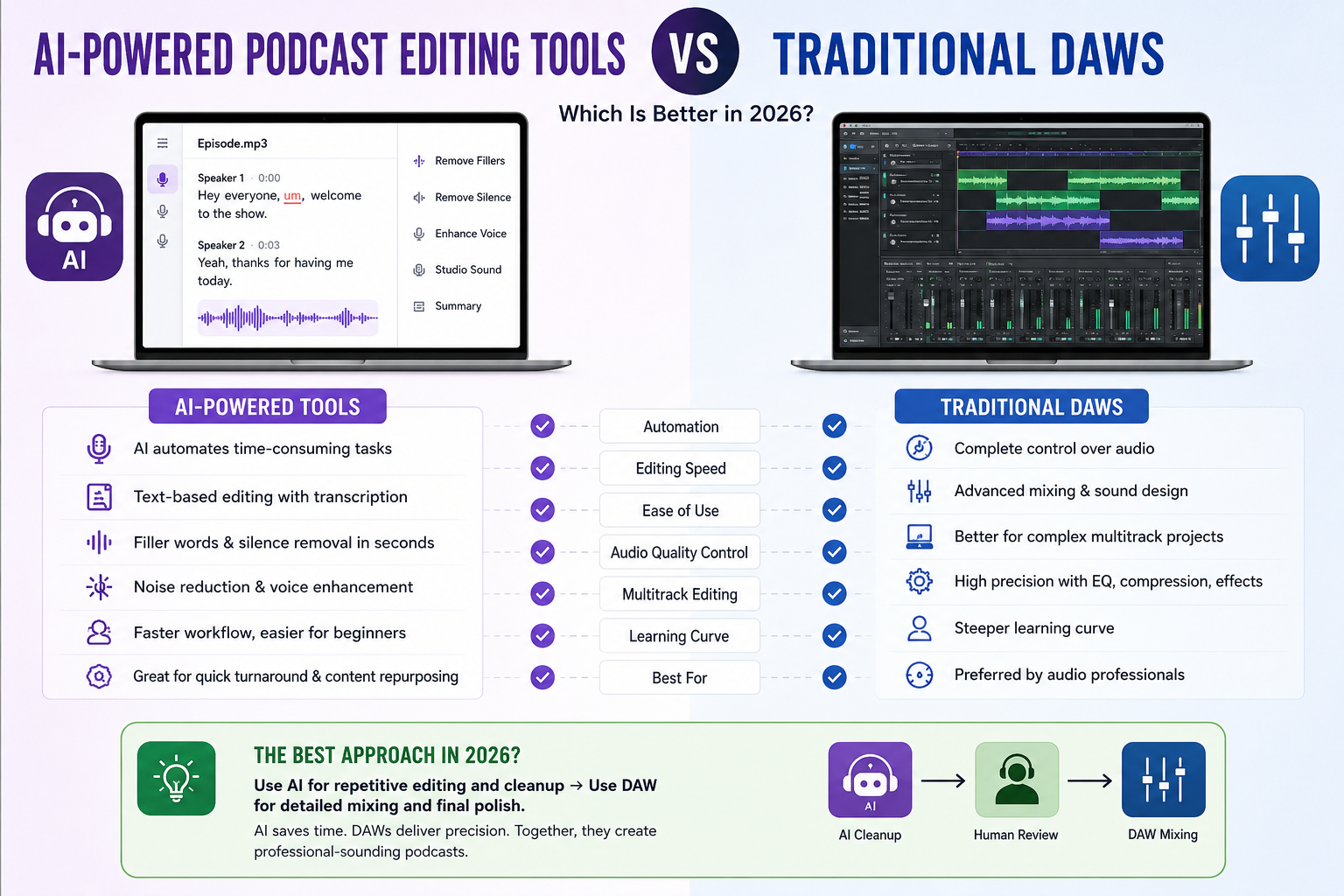
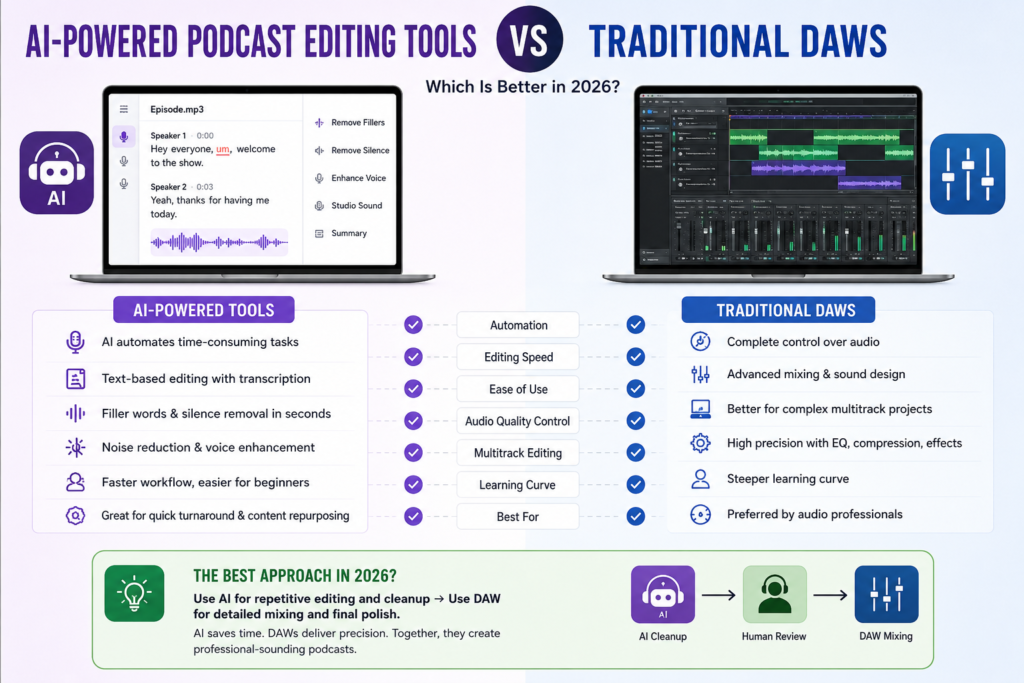
AI-powered podcast editing tools vs traditional DAWs is no longer simply a question of old technology versus new technology. AI editors are designed to make repetitive editing faster, while traditional DAWs provide much deeper control over audio.
For many podcasters in 2026, the best solution isn’t choosing one exclusively. A combination of AI for repetitive cleanup and a DAW for final audio production can provide the best balance between speed and quality.
AI Podcast Editing Tools vs Traditional DAWs: Quick Comparison
| Feature | AI Podcast Editing Tools | Traditional DAWs |
|---|---|---|
| Ease of use | Excellent | Moderate to difficult |
| Editing speed | Very fast | Usually slower |
| Filler-word removal | Automated | Mostly manual |
| Silence removal | Automated or assisted | Manual/automation tools |
| Transcription | Usually built in | Often requires additional tools |
| Text-based editing | Common | Usually unavailable |
| Noise cleanup | Often AI-assisted | Manual/plugin-based |
| Detailed EQ control | Limited to moderate | Excellent |
| Compression control | Automated or simplified | Advanced |
| Multitrack mixing | Varies | Excellent |
| Sound design | Limited to moderate | Excellent |
| Learning curve | Low | Medium to high |
| Professional audio control | Moderate | Excellent |
| Best for | Fast podcast production | Detailed audio production |
What Are AI-Powered Podcast Editing Tools?
AI-powered podcast editing tools use machine learning and speech/audio processing to automate parts of the editing process.
Instead of manually searching through a two-hour recording for every “um,” “uh,” pause, mistake, or unwanted section, AI can identify many of these elements automatically.
For example, Descript allows creators to edit audio through its transcript and provides AI features for removing filler words, improving voice quality, transcription, and other podcast-production tasks.
A typical AI podcast editing workflow may look like this:
Record → Upload → Transcribe → Remove unwanted sections → Clean audio → Review → Export
This is particularly useful for interview podcasts where the raw recording can be several hours long.
Common AI Podcast Editing Features
AI-powered editors may offer features such as:
- Automatic transcription
- Filler-word detection
- Silence removal
- Background-noise reduction
- Voice enhancement
- Automatic leveling
- Speaker identification
- Text-based audio editing
- Captions
- Show-note generation
- Audio restoration
- AI-assisted content repurposing
The exact feature set varies considerably between platforms.
What Is a Traditional DAW?
A DAW, or Digital Audio Workstation, is software designed for recording, editing, mixing, processing, and producing audio.
Examples include:
- Adobe Audition
- Logic Pro
- REAPER
- Pro Tools
- GarageBand
Audacity is also widely used for podcast and audio editing, although it is more accurately described as an audio editor rather than a full professional DAW.
Traditional audio-production software gives you direct control over things such as:
- Waveforms
- Tracks
- EQ
- Compression
- Reverb
- Noise reduction
- Automation
- Volume
- Panning
- Effects
- Multitrack mixing
- Audio timing
For example, Adobe Audition provides multitrack podcast workflows where creators can record audio, add music, mix tracks, and export the final episode.
This level of control is one of the biggest reasons professional audio editors continue to use traditional DAWs.
AI-Powered Podcast Editing Tools vs Traditional DAWs: Major Differences
1. Editing Speed
This is where AI tools have one of their biggest advantages.
Imagine recording a 90-minute interview.
You might have:
- 80 filler words
- 20 long pauses
- Several mistakes
- Repeated sentences
- Background noise
- Multiple sections that need cutting
Finding and removing all of these manually can take considerable time.
AI-based editors can identify many of these elements automatically.
For example, Descript’s AI editing features can identify filler words and unnecessary chatter and remove them with minimal manual work.
Winner: AI tools
If your priority is producing episodes quickly, AI has a significant advantage.
2. Ease of Use
Traditional DAWs can be intimidating for beginners.
A new user may need to understand:
- Tracks
- Waveforms
- Gain
- EQ
- Compression
- Plugins
- Automation
- Routing
- Effects
- Export settings
AI podcast editors generally hide much of this complexity.
Instead of manually finding a sentence in a waveform, some tools allow you to find the sentence in a transcript and edit the corresponding audio.
This creates a much easier workflow for beginners.
Winner: AI tools
For someone starting their first podcast, an AI-focused editor can dramatically reduce the learning curve.
3. Filler Word Removal
Filler words such as:
- Um
- Uh
- Like
- You know
- Basically
- Actually
are extremely common in conversational podcasts.
Removing them manually requires listening through the recording and finding every occurrence.
AI tools can automatically identify many filler words.
However, automatic removal should still be reviewed.
Why?
Because conversational language is complicated. Sometimes a word that looks like a filler is actually important to the sentence.
Winner: AI tools
AI is considerably more convenient for this specific task.
4. Silence and Pause Removal
Long pauses can make a podcast feel slow.
AI-powered editors can detect silence and help remove or shorten unnecessary gaps.
Traditional audio software can also accomplish this through editing and automation tools, but the workflow may require more manual configuration.
The difference becomes particularly noticeable when editing long interviews.
Winner: AI tools for speed
Traditional DAWs can provide more control over exactly how much silence is removed.
5. Noise Reduction and Voice Enhancement
AI has also changed the way creators handle poor-quality recordings.
Modern AI audio tools can attempt to reduce:
- Background noise
- Room noise
- Echo
- Humming
- Other unwanted sounds
Some tools can also enhance speech and make voices sound cleaner.
Descript, for example, currently offers Studio Sound, which uses AI to remove noise and enhance voices.
But AI enhancement isn’t magic.
If the original recording is extremely distorted, clipped, or damaged, aggressive processing can sometimes create unnatural artifacts.
A skilled audio engineer using a traditional DAW may prefer manual processing when the source recording requires delicate treatment.
Winner: Tie
AI wins for convenience.
DAWs win for detailed control.
6. Audio Quality and Professional Control
This is where traditional DAWs remain extremely powerful.
Suppose you want to manually adjust:
- Vocal EQ
- Compression ratio
- Attack and release
- De-essing
- Reverb
- Stereo positioning
- Music levels
- Room tone
- Individual speaker volume
A professional DAW gives you granular control over these parameters.
Adobe Audition’s multitrack workflow, for example, is designed around mixing multiple audio tracks and applying detailed processing. Adobe also provides waveform and multitrack editing environments for different types of audio work.
Winner: Traditional DAWs
If your priority is maximum control over the final sound, DAWs remain the better option.
7. Multitrack Podcast Editing
Multitrack editing becomes especially important for:
- Two-host podcasts
- Interview shows
- Remote interviews
- Video podcasts
- Podcasts with music
- Podcasts with sound effects
Imagine a podcast with:
Host 1 + Host 2 + Guest + Intro Music + Background Music + Sound Effects
A traditional DAW gives you separate tracks that can be independently edited, processed, muted, moved, and mixed.
Some AI podcast platforms also support multitrack workflows, but the depth of control varies from one product to another.
Winner: Traditional DAWs
For complex audio projects, a DAW generally offers greater flexibility.
8. Text-Based Editing
This is one of the biggest innovations introduced by AI-powered podcast editors.
Instead of looking at a waveform, you can work with a transcript.
For example:
“Today we are going to talk about AI… um… actually, let’s start with the history of AI.”
You can edit the transcript and remove the unwanted section.
The corresponding audio can then be edited automatically.
This is particularly useful for spoken-word content because podcasters think in terms of words and sentences, not just waveforms.
Winner: AI tools
Text-based editing is one of the biggest reasons beginners and content creators prefer AI podcast editors.
9. Learning Curve
A traditional DAW can take weeks or months to become comfortable with.
You may need to learn:
- Editing shortcuts
- Track management
- Signal flow
- EQ
- Compression
- Plugins
- Mixing
- Mastering
- Export settings
AI tools generally require less technical knowledge.
A beginner can often upload a recording, let the software process it, review the result, and export the episode.
Winner: AI tools
If you don’t have audio-production experience, AI is usually the easier starting point.
10. Creative Control
Podcast editing isn’t always about cleaning audio.
Sometimes you want to create a particular mood.
For example:
- Dramatic intro
- Cinematic sound effects
- Music transitions
- Layered ambience
- Custom sound design
- Precise vocal processing
Traditional DAWs are built for this type of creative control.
AI tools can assist with production, but they generally aren’t a replacement for a skilled audio engineer when detailed sound design is required.
Winner: Traditional DAWs
Best AI-Powered Podcast Editing Tools in 2026
There isn’t one AI podcast editor that is perfect for every creator.
Your best choice depends on the type of podcast you produce.
1. Descript
Descript is one of the most recognizable AI-focused editing platforms for podcasts and video content.
Its major advantage is text-based editing.
You can work with a transcript instead of relying entirely on waveform editing.
Its current feature set includes transcription, filler-word removal, AI voice/audio enhancement, captions, and other AI-assisted editing functions.
Best for:
- Beginners
- Interview podcasts
- Video podcasts
- Creators who want fast editing
- People who prefer text-based workflows
2. Riverside
Riverside is particularly useful for creators who need remote recording combined with podcast production workflows.
It can be attractive if your guests are in different locations and you want recording and editing capabilities within the same ecosystem.
Best for:
- Remote interviews
- Video podcasts
- Podcast teams
- Creators wanting recording + editing in one workflow
3. AI Audio Enhancement Tools
There is also a growing category of AI tools focused specifically on audio enhancement rather than replacing the entire editing workflow.
These can be useful for:
- Noise reduction
- Voice enhancement
- Loudness normalization
- Audio cleanup
- Speech improvement
A hybrid workflow can be particularly effective: use AI for cleanup, then move the audio into a DAW for final mixing.
Best Traditional DAWs for Podcast Editing
1. Adobe Audition
Adobe Audition is a strong choice for professional podcast editing.
It provides:
- Multitrack sessions
- Waveform editing
- Audio effects
- Mixing
- Recording
- Noise reduction
- Detailed audio processing
Adobe’s own current podcast tutorial demonstrates recording, multitrack editing, adding music, and exporting a finished podcast.
Best for: Professional podcast editors and creators who need detailed control.
2. REAPER
REAPER is popular among experienced audio users because it provides extensive audio-production capabilities while remaining relatively lightweight compared with some larger production suites.
Best for:
- Advanced users
- Multitrack podcasts
- Audio engineers
- Creators who want extensive customization
3. Logic Pro
Logic Pro is a powerful option for Mac users who want professional audio production capabilities.
It is especially attractive if your podcast includes:
- Music
- Sound effects
- Advanced mixing
- Complex audio arrangements
Best for: Mac users who want podcasting plus broader music/audio-production capabilities.
4. Audacity
Audacity is one of the most accessible options for beginners because it is free and widely used for basic audio editing.
It’s suitable for:
- Cutting audio
- Recording
- Basic cleanup
- Simple podcast editing
- Beginners on a budget
It doesn’t provide the same complete professional-production environment as high-end DAWs, but for a straightforward podcast, it can be more than enough.
AI Podcast Editor vs DAW: Which One Is Better?
The answer depends on what you are trying to accomplish.
Choose an AI podcast editor if:
- You’re a beginner.
- You want to publish quickly.
- You don’t want to learn complicated audio software.
- Your podcast is mostly conversations.
- You need automatic transcription.
- You frequently remove filler words.
- You produce lots of episodes.
- You create video clips and social content.
- You want AI-assisted audio cleanup.
Choose a traditional DAW if:
- You are an experienced editor.
- Audio quality is your top priority.
- You need detailed mixing control.
- Your podcast contains multiple audio tracks.
- You use complex music and sound effects.
- You want precise EQ and compression.
- You need advanced sound design.
- You want complete control over the final mix.
What About a Hybrid Workflow?
For many creators, AI + DAW is actually the best approach.
Instead of asking:
“Should I use AI or a DAW?”
Ask:
“Which parts of my workflow should AI handle, and which parts should I control manually?”
For example:
Step 1: Record
Record your podcast using a good microphone and a suitable recording platform.
Step 2: AI Cleanup
Use AI to:
- Transcribe the episode
- Remove obvious filler words
- Detect unnecessary pauses
- Clean background noise
- Improve speech
Step 3: Human Review
Listen to the edited episode.
Check whether the AI accidentally removed:
- Important words
- Natural pauses
- Emotional moments
- Speaker reactions
- Important context
Step 4: DAW Mixing
Move the cleaned audio into your DAW.
Then manually adjust:
- EQ
- Compression
- Loudness
- Music
- Sound effects
- Speaker balance
- Intro/outro
Step 5: Final Export
Export the final master according to the requirements of your podcast hosting platform.
This workflow gives you the speed of AI and the control of a DAW.
Why AI Shouldn’t Completely Replace Human Editing
AI is becoming extremely capable, but automatic editing still requires supervision.
An algorithm doesn’t always understand the meaning or emotional context of a conversation.
For example, imagine a guest says:
“I… I don’t know if I should say this.”
A human editor might recognize that the hesitation adds emotion and authenticity.
An aggressive automatic editing system might remove some of it.
Similarly, removing every pause isn’t necessarily good editing.
A pause can:
- Create suspense
- Give someone time to think
- Emphasize an important statement
- Make a conversation feel natural
Therefore, good AI podcast editing should be reviewed rather than blindly accepted.
AI vs DAW: Which Is Faster?
For repetitive spoken-word editing, AI generally has the advantage.
Consider a long interview.
Traditional workflow:
Listen → Find mistake → Zoom → Cut → Move clip → Check transition → Repeat
AI workflow:
Upload → Transcribe → AI identifies edits → Review → Export
The difference can become significant when you’re producing multiple episodes every week.
However, once you reach detailed mixing and sound design, the time advantage may decrease because you still need human judgment.
AI vs DAW: Which Produces Better Sound?
There isn’t a universal winner.
A good AI tool can produce an impressive result quickly, especially when the recording is already reasonably clean.
A skilled audio engineer using a DAW can usually exercise more precise control over the final result.
The quality of the original recording also matters enormously.
A poor microphone recording in a noisy room cannot always be transformed into a perfect studio recording by either AI or manual editing.
So don’t rely on editing software to solve every recording problem.
Start with:
- A suitable microphone
- Proper microphone positioning
- Controlled room acoustics
- Appropriate recording levels
- Minimal background noise
Then use AI or a DAW to polish the recording.
Is AI Podcast Editing Worth It in 2026?
For many podcasters, yes.
AI is especially valuable when time is more expensive than manual editing.
Suppose you produce four podcast episodes every month and each episode takes several hours to edit manually.
Even a significant reduction in repetitive editing can free up time for:
- Recording
- Research
- Marketing
- Social media
- Guest outreach
- Community building
- Content repurposing
This is why AI podcast editing has become more than just a novelty. It can change the economics of podcast production.
At the same time, professional editors shouldn’t assume that AI eliminates the need for technical audio knowledge.
Instead, AI can remove repetitive work and allow editors to spend more time on decisions that actually require human judgment.
How to Check and Improve Your Website Performance After Launch: Complete Guide for Bloggers in 2026
Frequently Asked Questions
Is AI better than a DAW for podcast editing?
Not universally. AI is generally better for speed, automation, transcription, filler-word removal, and simple cleanup. Traditional DAWs are better for detailed mixing, sound design, and precise audio control.
Can AI replace a podcast editor?
For simple podcasts, AI can automate a large portion of the editing workflow. However, human review is still valuable for maintaining natural conversations, correcting AI mistakes, and making creative decisions.
Is Descript better than Adobe Audition?
They are designed around different workflows. Descript is particularly strong for transcript-based, fast editing, while Adobe Audition offers deeper traditional audio-production and multitrack control.
What is the best podcast editing software for beginners?
An AI-focused editor such as Descript can be easier for beginners because of its transcript-based workflow and automated editing features. Audacity is another attractive option if you want a free traditional audio editor.
Can I use AI and a DAW together?
Yes. In fact, this can be one of the most efficient workflows. Use AI for transcription, filler-word detection, silence removal, and initial cleanup, then use a DAW for detailed mixing and final production.
Do professional podcasters still use DAWs?
Yes. DAWs remain valuable when a podcast requires detailed audio processing, multitrack mixing, music, sound effects, or professional sound design.
Is AI podcast editing expensive?
It depends on the platform. Some tools provide free or limited plans, while advanced AI features may require a subscription. Traditional options range from free software such as Audacity to paid professional applications.
Final Verdict: AI Podcast Editing Tools vs Traditional DAWs
The debate between AI-powered podcast editing tools vs traditional DAWs doesn’t really have a single winner.
They solve different problems.
AI-powered podcast editors win when you need:
- Speed
- Automation
- Easy editing
- Transcription
- Filler-word removal
- Fast cleanup
- Simple workflows
Traditional DAWs win when you need:
- Precision
- Advanced mixing
- Detailed EQ
- Multitrack control
- Sound design
- Professional audio processing
For a beginner launching a weekly interview podcast, an AI editor may be the smartest starting point.
For an experienced audio engineer producing a highly polished show, a traditional DAW may still be the better choice.
But for creators who want both speed and quality, the strongest approach in 2026 may be a hybrid workflow:
AI for repetitive editing → Human review → DAW for final polish.
That way, AI handles the boring work while the human editor remains in control of the final sound.