
If you’ve recently started a blog or launched a website, you’ve probably heard people say:
“Install Google Analytics.”
“Submit your sitemap to Google Search Console.”
“Don’t forget Bing Webmaster Tools.”
But if you’re a beginner, all three tools can seem confusing. They look similar at first glance, yet each serves a completely different purpose.
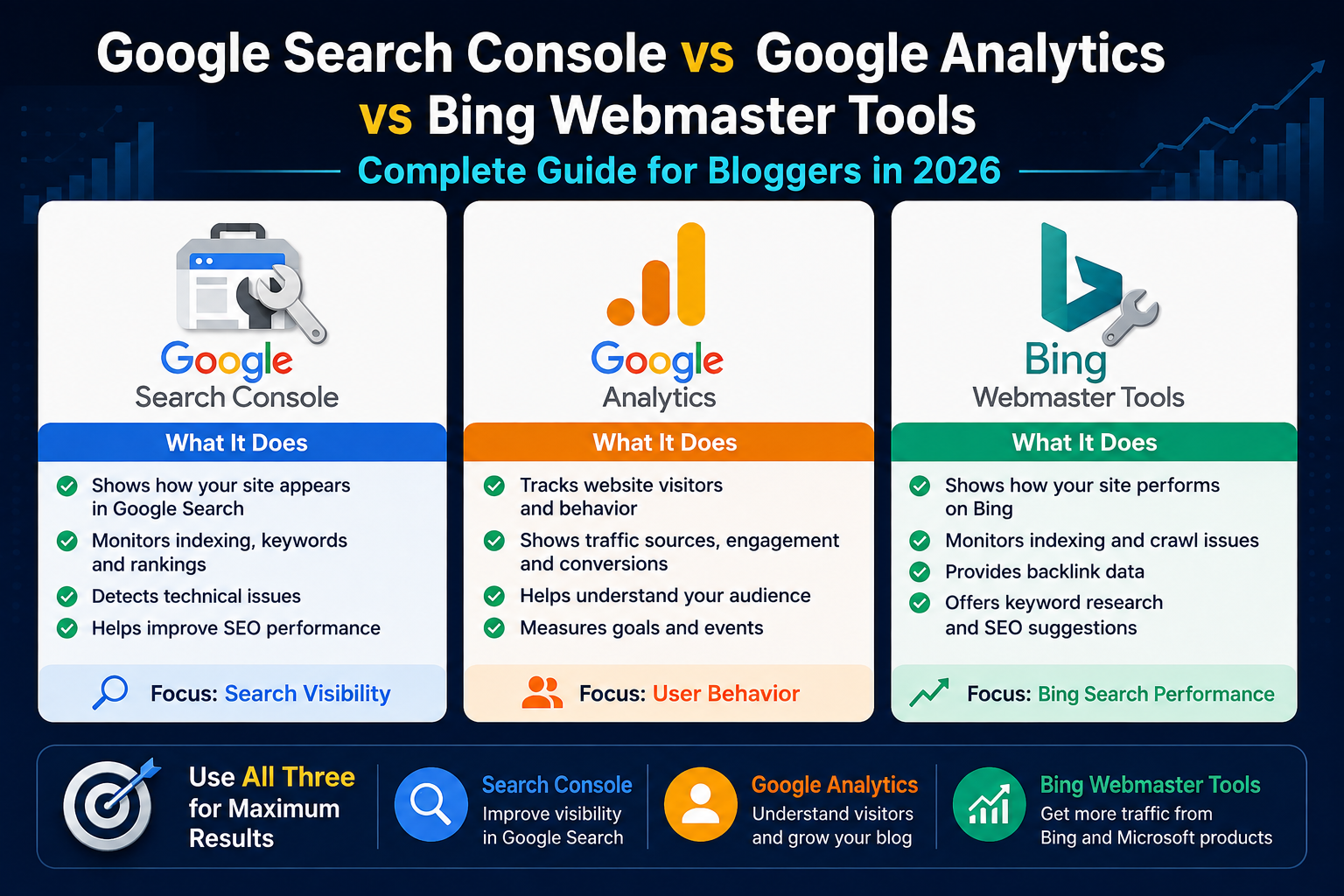
One tool tells you how people find your website.
Another shows what visitors do after they arrive.
The third helps you improve your visibility on Bing Search while providing additional SEO insights.
The truth is, these tools are not competitors. They work best when used together. Ignoring any one of them means missing valuable information that can help you grow your blog faster.
Whether you’re a blogger, affiliate marketer, freelancer, business owner, or SEO beginner, understanding these tools is one of the smartest investments you can make.
In this complete guide, you’ll learn:
- What Google Search Console is
- What Google Analytics 4 does
- Why Bing Webmaster Tools still matters
- The differences between all three
- Which reports you should check regularly
- How to use them together to improve SEO and traffic
Let’s start with one of the most important free SEO tools available today. Google Search Console vs Google Analytics vs Bing Webmaster Tools
12 Best AI Detector & AI Humanizer Tools in 2026 (Tested & Reviewed)
What Is Google Search Console?
Google Search Console (GSC) is a free tool from Google that helps website owners understand how their website performs in Google Search.
Instead of showing what users do after visiting your website, Search Console focuses on what happens before they arrive.
It tells you:
- Which keywords bring visitors
- How many impressions your pages receive
- How many clicks each page gets
- Your average ranking position
- Which pages are indexed
- Technical SEO issues affecting visibility
Think of Google Search Console as your website’s health report for Google Search.
If Google can’t crawl or index your pages correctly, your content may never appear in search results—no matter how good it is.
Why Every Blogger Should Use Google Search Console
Many beginners install Google Analytics but forget Search Console.
That’s a mistake.
Search Console provides SEO data that Analytics simply cannot.
For example, imagine one of your blog posts appears 10,000 times in Google Search but receives only 100 clicks.
Analytics only shows the visitors who actually reached your site.
Search Console reveals the hidden opportunity:
- 10,000 impressions
- 100 clicks
- 1% CTR
Now you know the title or meta description needs improvement.
Without Search Console, you’d never see this.
Key Features of Google Search Console
1. Performance Report
The Performance report is the most valuable section of Search Console.
It answers questions like:
- Which pages get the most traffic?
- Which keywords bring visitors?
- How many impressions does each page receive?
- What’s the click-through rate (CTR)?
- What’s my average ranking position?
Example
Imagine your article ranks like this:
| Keyword | Impressions | Clicks | Position |
|---|---|---|---|
| Life Path Number 8 | 8,000 | 180 | 7.2 |
This tells you:
- Google already trusts the page.
- It appears frequently in search results.
- Improving the title and meta description could significantly increase clicks.
Small changes can lead to noticeable traffic gains.
2. URL Inspection Tool
This is one of the first tools you should learn.
It allows you to inspect any page on your website.
You can instantly see:
- Is the page indexed?
- When was it last crawled?
- Can Google access it?
- Are there indexing problems?
- Can I request indexing?
Whenever you publish a new article, paste its URL into the URL Inspection tool and request indexing.
This doesn’t guarantee immediate indexing, but it alerts Google to your new content.
3. Indexing Report
Publishing a blog post doesn’t automatically mean it appears on Google.
Google first needs to:
- Discover the page
- Crawl it
- Index it
The Indexing report shows exactly which pages are:
- Indexed
- Not indexed
- Excluded
- Blocked
- Crawled but not indexed
If important pages aren’t indexed, this report helps you identify the reason.
4. Sitemap Submission
A sitemap is like a roadmap for search engines.
It lists the important pages on your website so Google can discover them more efficiently.
Most WordPress SEO plugins automatically generate a sitemap.
Once it’s ready, submit it in Search Console.
Benefits include:
- Faster discovery of new pages
- Better crawling efficiency
- Easier monitoring of indexed content
5. Core Web Vitals
Page experience matters.
Google measures user experience using Core Web Vitals.
These metrics evaluate:
- Loading speed
- Visual stability
- Interactivity
If your website loads slowly or shifts elements while loading, Search Console will highlight the affected pages.
Improving these metrics can enhance both rankings and user satisfaction.
6. Mobile Usability
More than half of website traffic now comes from mobile devices.
Search Console helps identify issues such as:
- Text that’s too small
- Clickable elements too close together
- Content wider than the screen
- Mobile rendering problems
A mobile-friendly site is essential for modern SEO.
7. Manual Actions
Google may apply a manual action if your website violates its spam policies.
Possible reasons include:
- Unnatural backlinks
- Hidden text
- Spam content
- Cloaking
- Thin or deceptive pages
If this happens, Search Console will notify you and explain the issue.
Thankfully, most legitimate bloggers never encounter manual actions.
8. Security Issues
Search Console also warns you if Google detects:
- Malware
- Hacked pages
- Dangerous downloads
- Security vulnerabilities
Fixing these issues quickly protects both your visitors and your search visibility.
Benefits of Google Search Console
Here are the biggest advantages of using Search Console:
Completely Free
You don’t need a paid subscription.
Every website owner can access powerful SEO insights at no cost.
Discover Real Keywords
Many keyword tools estimate search data.
Search Console shows the actual search queries that generated impressions and clicks for your website.
That’s incredibly valuable for planning future content.
Improve Click-Through Rate
If a page receives:
- High impressions
- Low clicks
It’s often a sign that your title or meta description needs improvement.
Increasing CTR can boost traffic without publishing new content.
Find Technical SEO Problems
Instead of guessing why a page isn’t ranking, Search Console highlights issues such as:
- Crawl errors
- Indexing problems
- Broken pages
- Mobile usability issues
Fixing technical problems often has a positive impact on visibility.
Track SEO Growth
Search Console makes it easy to monitor:
- Organic clicks
- Impressions
- Ranking positions
- Indexed pages
Comparing month-over-month data helps you understand whether your SEO strategy is working.
Limitations of Google Search Console
Although it’s an excellent SEO tool, Search Console isn’t designed to replace Analytics.
It doesn’t tell you:
- How long visitors stay on your site
- Which pages users visit next
- Bounce rate
- User demographics
- Conversions
- Revenue
- Session duration
That’s where Google Analytics 4 becomes essential.
Best Practices for Using Google Search Console
To get the most value from Search Console, follow these habits:
- Check Performance reports weekly.
- Submit your XML sitemap after major updates.
- Inspect new URLs after publishing.
- Monitor indexing issues regularly.
- Improve pages with high impressions but low CTR.
- Update content based on keyword opportunities.
- Review Core Web Vitals every month.
- Fix crawl errors as soon as they appear.
Consistency is far more effective than checking the tool once every few months.
Common Beginner Mistakes
Avoid these common mistakes:
- Ignoring indexing errors.
- Never submitting a sitemap.
- Focusing only on clicks instead of impressions.
- Forgetting to monitor CTR.
- Publishing content without requesting indexing.
- Ignoring mobile usability warnings.
- Checking data only when traffic drops.
Small SEO improvements made consistently often lead to better long-term growth.
Final Thoughts on Google Search Console
Google Search Console is one of the most powerful free SEO tools available.
It helps you understand how Google sees your website, identifies technical problems, reveals valuable keyword data, and highlights opportunities to increase organic traffic.
If you’re serious about growing your blog through search engines, Search Console should become part of your weekly routine.
However, Search Console only tells part of the story.
It explains how visitors found your website, but it doesn’t show what they did after arriving
Google Analytics 4 (GA4)
In Part 1, we learned how Google Search Console helps you understand your website’s visibility in Google Search.
Now it’s time to explore Google Analytics 4 (GA4)—the tool that tells you what visitors do after they land on your website.
While Search Console focuses on search performance, Google Analytics focuses on user behavior.
Together, these two tools provide a complete picture of your website’s performance.
What Is Google Analytics 4 (GA4)?
Google Analytics 4 (GA4) is Google’s free website analytics platform that helps you understand how visitors interact with your website.
Instead of only counting page views, GA4 tracks user actions such as:
- Page visits
- Scrolls
- Clicks
- Downloads
- Form submissions
- Video engagement
- Session duration
- Traffic sources
- Purchases and conversions
In simple words:
Google Search Console tells you how people found your website.
Google Analytics tells you what they did after they arrived.
If your goal is to increase engagement, improve conversions, and grow your blog, GA4 is essential.
Why Every Blogger Should Use Google Analytics
Imagine your blog receives 5,000 visitors this month.
Without Analytics, you only know the visitor count.
With GA4, you can answer questions like:
- Which pages are most popular?
- Which traffic source brings the highest-quality visitors?
- How long do users stay?
- Which country sends the most traffic?
- Are visitors using mobile or desktop?
- Which blog posts lead to newsletter sign-ups?
- Which articles have the highest engagement?
These insights help you make smarter content and marketing decisions.
Key Features of Google Analytics 4
1. Realtime Report
One of the first reports you’ll notice is the Realtime dashboard.
It shows what is happening on your website right now.
You can see:
- Active users
- Current pages being viewed
- User locations
- Traffic sources
- Events happening live
This report is especially useful after:
- Publishing a new blog post
- Sharing content on social media
- Sending an email newsletter
- Running a marketing campaign
It lets you verify instantly that traffic is reaching your website.
2. Acquisition Reports
The Acquisition section answers one of the most important questions:
Where are my visitors coming from?
GA4 categorizes traffic into channels such as:
- Organic Search
- Direct
- Social
- Referral
- Paid Search
For example:
| Traffic Source | Users |
|---|---|
| Google Search | 4,200 |
| 800 | |
| 500 | |
| Direct | 300 |
| Bing | 120 |
From this report, you can identify your strongest traffic sources and decide where to focus your efforts.
3. Engagement Reports
Getting traffic is only half the battle.
The real question is:
Are visitors actually engaging with your content?
The Engagement report shows:
- Engaged sessions
- Average engagement time
- Event count
- Views
- Top-performing pages
If visitors leave after a few seconds, it may indicate:
- Slow loading speed
- Weak introductions
- Poor content quality
- Misleading titles
Improving engagement often leads to better long-term results.
4. Events
One of GA4’s biggest improvements is its event-based tracking model.
Almost every interaction on your website can be tracked as an event.
Examples include:
- Clicking a button
- Downloading a PDF
- Watching a video
- Scrolling down a page
- Clicking an affiliate link
- Completing a purchase
- Submitting a contact form
This gives you a much deeper understanding of user behavior than simple page views.
5. Conversions
For bloggers and businesses, conversions matter more than traffic alone.
Examples of conversions include:
- Newsletter subscriptions
- Contact form submissions
- Affiliate link clicks
- Product purchases
- Course enrollments
Tracking conversions helps you measure whether your website is achieving its goals.
A page with fewer visitors but more conversions can be far more valuable than a page with thousands of casual readers.
6. Demographics Report
Understanding your audience helps you create better content.
GA4 can provide insights into:
- Countries
- Cities
- Languages
- Device categories
- Browser types
- Operating systems
For example, if most of your audience comes from the United States, you might write content tailored to U.S. readers or optimize publishing times for that time zone.
7. Technology Report
Not every visitor uses the same device.
GA4 helps you identify:
- Mobile users
- Desktop users
- Tablet users
It also shows:
- Browser usage
- Screen resolution
- Operating systems
If 80% of your audience is on mobile devices, mobile optimization becomes a top priority.
8. Landing Pages Report
The Landing Pages report reveals which pages visitors see first when they arrive on your website.
This information is valuable because your landing pages often create the first impression.
If a landing page has:
- High traffic
- Low engagement
it may need improvements such as:
- Better headlines
- Faster loading speed
- Stronger internal links
- Clear calls to action
Optimizing top landing pages can significantly improve overall website performance.
Benefits of Google Analytics 4
Understand Visitor Behavior
Analytics shows exactly how people interact with your website.
Instead of guessing what users like, you can rely on real data.
Improve Content Strategy
By identifying your most popular articles, you can create more content around topics your audience already enjoys.
This helps increase both traffic and engagement.
Track Marketing Campaigns
Whether you’re sharing articles on Facebook, Pinterest, LinkedIn, or through email, GA4 shows which campaigns drive the most visitors and conversions.
This helps you focus on channels that deliver results.
Measure Business Goals
Analytics isn’t just for bloggers.
Businesses can track:
- Sales
- Leads
- App downloads
- Course enrollments
- Form submissions
Knowing which pages generate conversions helps improve your return on investment.
Completely Free
Google Analytics 4 is available at no cost for most websites, making it one of the most powerful analytics platforms available.
Limitations of Google Analytics
Although GA4 is incredibly useful, it also has some limitations.
It does not tell you:
- Which keywords generated impressions in Google Search
- Average ranking position
- Indexing issues
- Crawl errors
- Sitemap status
- Core Web Vitals from Google Search
That’s why Google Search Console remains an essential companion tool.
Best Practices for Using Google Analytics
To get the most value from GA4:
- Check Realtime after publishing new content.
- Review Acquisition reports weekly.
- Analyze Engagement reports monthly.
- Track important conversions.
- Compare month-over-month traffic trends.
- Identify your top landing pages.
- Monitor mobile vs desktop performance.
- Use insights to update older content.
Remember, collecting data is only useful if you act on it.
Common Beginner Mistakes
Many new bloggers install Analytics but rarely use it effectively.
Avoid these common mistakes:
- Looking only at page views.
- Ignoring engagement metrics.
- Not setting up conversions.
- Never checking traffic sources.
- Focusing on vanity metrics instead of meaningful goals.
- Forgetting to monitor mobile performance.
- Making content decisions without data.
Analytics should guide your strategy, not just report numbers.
Google Search Console vs Google Analytics
A simple way to understand the difference is:
| Google Search Console | Google Analytics 4 |
|---|---|
| Shows how users found your website | Shows what users do on your website |
| Tracks search impressions and clicks | Tracks sessions and engagement |
| Helps improve SEO | Helps improve user experience |
| Reports keyword rankings | Reports visitor behavior |
| Monitors indexing and crawl issues | Monitors conversions and events |
The two tools answer different questions, and using them together gives you a complete understanding of your website.
Final Thoughts on Google Analytics 4
Google Analytics 4 is much more than a visitor counter.
It helps you understand your audience, measure engagement, track conversions, and evaluate the effectiveness of your content and marketing efforts.
If Google Search Console tells you how visitors arrived, Google Analytics tells you whether your website kept them engaged.
Together, they form the foundation of a successful SEO and content strategy.
What Is Bing Webmaster Tools?
Bing Webmaster Tools is Microsoft’s free SEO platform that helps website owners monitor and optimize their site’s performance in the Bing search engine.
Many bloggers ignore Bing because Google dominates the search market. However, Bing still powers search results for:
- Microsoft Edge
- Windows Search
- Microsoft Copilot
- Yahoo Search (in many regions)
- DuckDuckGo (partially via Bing)
This means optimizing for Bing can bring additional organic traffic with very little extra effort.
If you’re serious about SEO, Bing Webmaster Tools deserves a place in your toolkit.
Why Bloggers Should Use Bing Webmaster Tools
Many websites rank differently on Bing than on Google.
A page struggling on Google may perform well on Bing and attract valuable visitors.
Benefits include:
- Extra search traffic
- Additional keyword insights
- Technical SEO reports
- Backlink information
- Website health monitoring
Since the tool is free, there’s little reason not to use it.
Key Features of Bing Webmaster Tools
1. Site Explorer
Site Explorer lets you see how Bing crawls your website.
It displays:
- Indexed pages
- Folder structure
- Crawl status
- Discovered URLs
This helps you quickly identify pages that Bing hasn’t indexed.
2. URL Inspection
Like Google Search Console, Bing allows you to inspect individual URLs.
You can check:
- Crawl status
- Index status
- Last crawl date
- Technical issues
If you publish a new article, requesting indexing here can help Bing discover it faster.
3. Keyword Research Tool
One unique feature is Bing’s built-in keyword research tool.
You can discover:
- Search volume
- Keyword trends
- Related keyword ideas
This can be useful when planning new blog posts or expanding existing content.
4. Backlink Report
Backlinks remain an important ranking factor.
Bing Webmaster Tools shows:
- Referring domains
- Backlinks
- Linked pages
- Anchor text
This helps you monitor your website’s backlink profile without paying for premium SEO software.
5. SEO Reports
The SEO Reports section scans your website for common optimization issues.
Examples include:
- Missing meta descriptions
- Duplicate titles
- Broken links
- Missing H1 headings
- Long page titles
These recommendations make it easier to improve on-page SEO.
6. Crawl Control
Unlike many SEO tools, Bing allows you to control when its crawler visits your website.
If your server has limited resources, you can reduce crawl activity during busy hours.
Benefits of Bing Webmaster Tools
Using Bing Webmaster Tools provides several advantages:
- Completely free
- Easy website verification
- Keyword research
- Backlink analysis
- Technical SEO insights
- Crawl diagnostics
- Additional organic traffic opportunities
Although Google sends the majority of traffic for many websites, Bing can still become a valuable secondary source.
Limitations of Bing Webmaster Tools
Bing Webmaster Tools does not replace Google Search Console or Google Analytics.
It lacks detailed:
- User behavior reports
- Engagement metrics
- Conversion tracking
- Session analysis
That’s why it works best alongside the other two platforms.
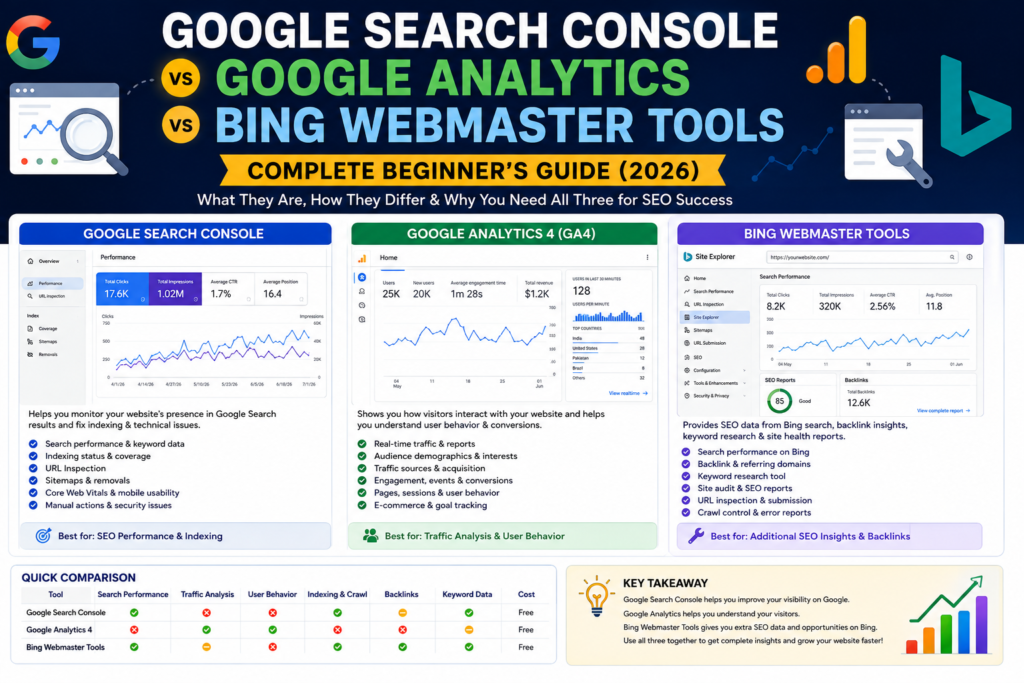
Google Search Console vs Google Analytics vs Bing Webmaster Tools
| Feature | Google Search Console | Google Analytics 4 | Bing Webmaster Tools |
|---|---|---|---|
| Search Performance | ✅ | ❌ | ✅ |
| Visitor Behavior | ❌ | ✅ | ❌ |
| Organic Keywords | ✅ | Limited | ✅ |
| User Engagement | ❌ | ✅ | ❌ |
| Index Coverage | ✅ | ❌ | ✅ |
| URL Inspection | ✅ | ❌ | ✅ |
| Sitemap Submission | ✅ | ❌ | ✅ |
| Core Web Vitals | ✅ | ❌ | ❌ |
| Backlink Data | Limited | ❌ | ✅ |
| Conversion Tracking | ❌ | ✅ | ❌ |
| Cost | Free | Free | Free |
Which Tool Should You Use?
The answer is simple:
Use all three.
Each platform provides different insights.
Use Google Search Console if you want to:
- Improve SEO
- Find ranking keywords
- Monitor indexing
- Fix crawl errors
Use Google Analytics if you want to:
- Understand visitor behavior
- Track conversions
- Measure engagement
- Analyze traffic sources
Use Bing Webmaster Tools if you want to:
- Gain additional search traffic
- Monitor Bing rankings
- Analyze backlinks
- Find technical SEO improvements
How to Set Up All Three Tools
Step 1: Google Search Console
- Visit Google Search Console.
- Add your website.
- Verify domain ownership.
- Submit your XML sitemap.
- Inspect important URLs.
- Check indexing regularly.
Step 2: Google Analytics 4
- Create a GA4 property.
- Install the tracking code.
- Verify data collection.
- Set important events.
- Configure conversions.
- Review reports weekly.
Step 3: Bing Webmaster Tools
- Sign in with your Microsoft account.
- Import your website directly from Google Search Console (fastest method).
- Submit your sitemap.
- Run SEO reports.
- Monitor crawl and indexing status.
Common Beginner Mistakes
Avoid these mistakes:
Ignoring Search Console
Many bloggers publish articles but never check whether Google has indexed them.
Only Looking at Traffic
Traffic is important, but engagement and conversions matter more.
Forgetting Bing
Even if Bing sends fewer visitors today, it’s another free source of organic traffic.
Never Updating Old Articles
SEO isn’t just about publishing new content.
Updating older posts often improves rankings faster than writing brand-new articles.
Ignoring Technical SEO
Broken links, missing titles, duplicate content, and crawl issues can hurt rankings.
Review your reports regularly.
Best Practices
To keep your website healthy:
- Check Search Console every week.
- Review Analytics every week.
- Run Bing SEO reports once a month.
- Update old content regularly.
- Submit new sitemaps when needed.
- Improve pages with high impressions but low CTR.
- Fix crawl errors quickly.
- Monitor your top-performing pages.
Consistency produces better SEO results than checking these tools only when traffic drops.
Frequently Asked Questions
Is Google Search Console free?
Yes. Google Search Console is completely free for all website owners.
Is Google Analytics free?
Yes. Google Analytics 4 is free and suitable for most websites.
Is Bing Webmaster Tools worth using?
Absolutely.
Although Bing has a smaller market share than Google, it still sends valuable organic traffic and offers useful SEO insights.
Which tool is best for SEO?
Google Search Console is the most important SEO tool.
However, combining it with Bing Webmaster Tools provides broader search engine coverage.
Which tool tracks visitor behavior?
Google Analytics 4 tracks user behavior, engagement, conversions, and traffic sources.
Can I use all three together?
Yes.
In fact, that’s the recommended approach.
Each tool provides information the others don’t.
How often should I check these tools?
For most bloggers:
- Search Console → Weekly
- Google Analytics → Weekly
- Bing Webmaster → Monthly
Final Thoughts
If you’re serious about growing your blog, relying on a single tool isn’t enough.
Think of these platforms as pieces of a puzzle:
- Google Search Console helps you understand how your website performs in Google Search.
- Google Analytics 4 reveals how visitors interact with your content after they arrive.
- Bing Webmaster Tools gives you additional SEO insights and access to traffic from the Bing ecosystem.
Together, they help you:
- Discover new keyword opportunities.
- Improve technical SEO.
- Monitor website health.
- Understand user behavior.
- Increase organic traffic.
- Make smarter, data-driven decisions.
The best part?
All three tools are completely free.
Whether you’re running a personal blog, an affiliate website, an online store, or a business site, setting up these platforms is one of the smartest investments you can make for long-term growth.
Instead of guessing why your traffic is increasing—or dropping—you’ll have the data you need to improve your website with confidence.
Pro Tips
- Check Search Console weekly.
- Review GA4 monthly trends.
- Use Bing SEO reports to catch technical issues.
- Update old content based on search queries.
- Improve pages with high impressions but low CTR.
FAQs
- Is Google Search Console free?
- Is Google Analytics free?
- Is Bing Webmaster Tools worth using?
- Which tool is best for SEO?
- Can I use all three together?
- How often should I check these tools?
- Do I need coding knowledge to set them up?
Conclusion
Explain that these tools are complementary, not competitors:
- Search Console tells you how people find your site.
- Google Analytics shows what visitors do after they arrive.
- Bing Webmaster Tools gives additional SEO insights and visibility on Bing.
Using all three provides a complete picture of your website’s performance and helps you make smarter SEO decisions.
12 Best AI Detector & AI Humanizer Tools in 2026 (Tested & Reviewed)