
Background noise can make a good recording sound unprofessional.
Whether you’re recording a podcast, YouTube video, interview, voiceover, online course, or voice note, unwanted sounds such as wind, traffic, fan noise, AC hum, static, keyboard clicks, chatter, and room echo can distract listeners.
The good news is that you don’t always need professional audio-editing software to fix noisy recordings.
Today, AI-powered background noise removers can automatically detect unwanted sounds and enhance speech in just a few clicks.
In this guide, we’ll compare the best background noise removers in 2026, including tools for audio and video, free options, professional software, and simple online AI tools.
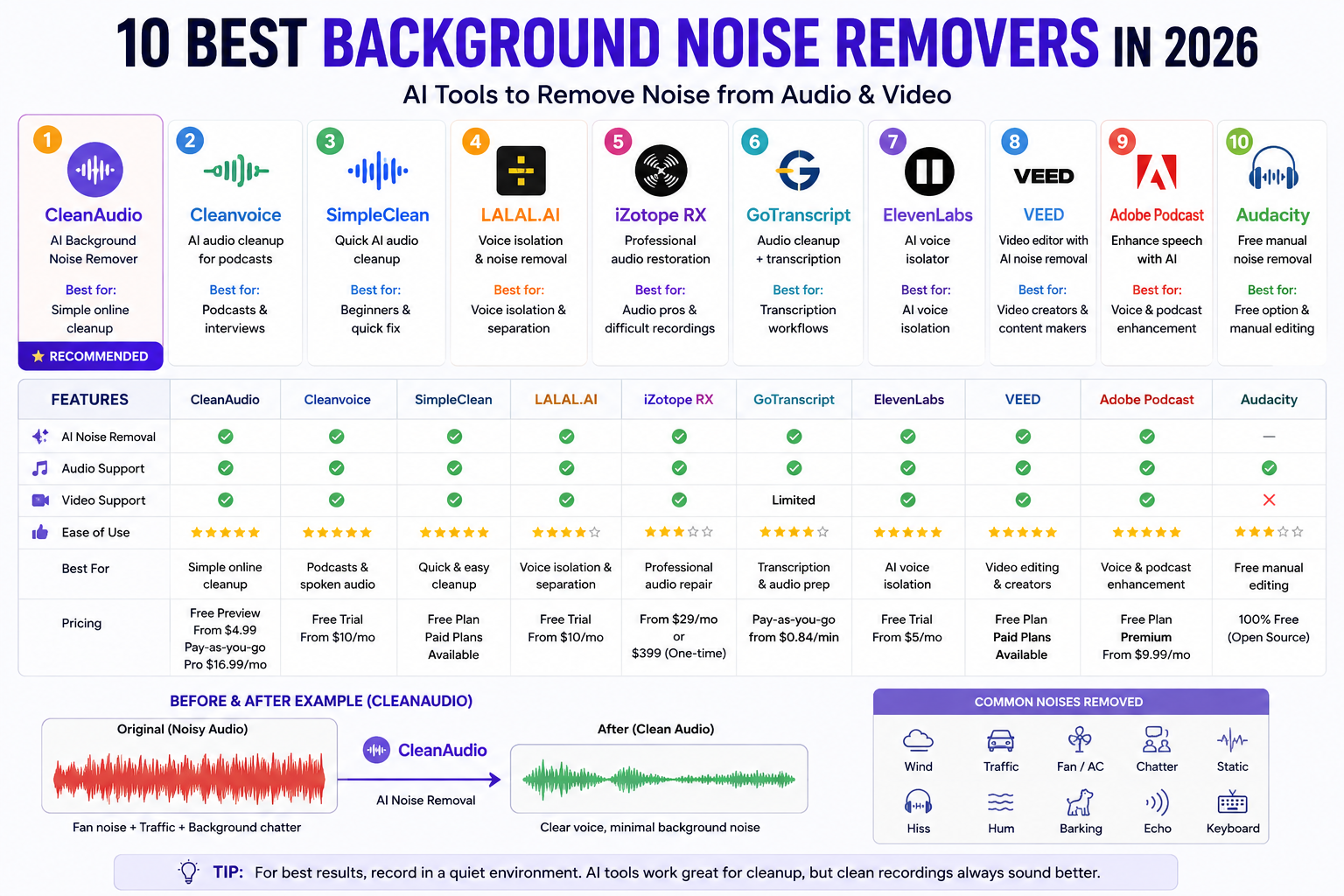
Best Background Noise Removers at a Glance
| Tool | Best For | Audio | Video | AI Noise Removal | Ease of Use |
|---|---|---|---|---|---|
| CleanAudio | Simple AI cleanup | ✅ | ✅ | ✅ | ⭐⭐⭐⭐⭐ |
| Cleanvoice | Podcasts | ✅ | ✅ | ✅ | ⭐⭐⭐⭐⭐ |
| SimpleClean | Quick audio cleanup | ✅ | ✅ | ✅ | ⭐⭐⭐⭐⭐ |
| LALAL.AI | Voice isolation | ✅ | ✅ | ✅ | ⭐⭐⭐⭐ |
| iZotope RX | Professional restoration | ✅ | ✅* | ✅ | ⭐⭐⭐ |
| GoTranscript | Audio cleanup + transcription | ✅ | Limited | ✅ | ⭐⭐⭐⭐ |
| ElevenLabs Voice Isolator | Speech isolation | ✅ | ✅ | ✅ | ⭐⭐⭐⭐⭐ |
| VEED | Video creators | ✅ | ✅ | ✅ | ⭐⭐⭐⭐⭐ |
| Adobe Podcast | Voice & podcasts | ✅ | ✅ | ✅ | ⭐⭐⭐⭐⭐ |
| Audacity | Free manual editing | ✅ | ❌ | Limited | ⭐⭐⭐ |
*iZotope RX is primarily professional audio software and can be used alongside video workflows.
1. CleanAudio — Best AI Background Noise Remover
If you want a simple online background noise remover, CleanAudio is one of the most interesting options to consider.
Its entire workflow is focused on cleaning audio and video rather than forcing users to learn a complicated audio editor.
CleanAudio says its AI can target common unwanted sounds such as wind, traffic, chatter, fan and AC noise, static, hum, and room echo. It supports common formats including MP3, WAV, MP4, and MOV.
How CleanAudio works
The process is simple:
Upload → AI analyzes the recording → Noise is removed → Preview → Download
One particularly useful feature is the 30-second cleaned preview, which allows you to hear the processed result before deciding whether you want the complete output.
CleanAudio is best for
- Podcasts
- YouTube videos
- Interviews
- Voiceovers
- Voice notes
- Online courses
- Outdoor recordings
- Noisy smartphone recordings
What can CleanAudio remove?
According to its current feature information, CleanAudio targets:
- Wind noise
- Fan noise
- AC noise
- Traffic
- Chatter
- Dog barking
- Static
- Microphone hiss
- Hum
- Room echo
It also says uploaded files are automatically deleted after 24 hours and aren’t used for AI training.
CleanAudio pricing
CleanAudio currently offers a free preview, pay-as-you-go processing, and a Pro subscription. Its website currently lists Pro at $16.99/month, with pay-as-you-go options starting at $4.99 for one hour.
Pros
- Very easy to use
- Browser-based
- Audio and video support
- 30-second free preview
- No complicated audio settings
- Supports many common formats
- Designed specifically for noise removal
Cons
- Not a complete professional DAW
- Advanced users may want more manual control
Best for: Beginners, podcasters, YouTubers and anyone who simply wants to upload a noisy recording and clean it quickly.
2. Cleanvoice — Best for Podcast Audio Cleanup
Cleanvoice is particularly useful for podcasters because it focuses on cleaning spoken-word recordings.
Besides background noise, its workflow can handle other common podcast distractions.
An interesting feature is that Cleanvoice allows users to create a custom template when they want to remove only background noise instead of automatically removing other elements such as filler words or mouth sounds.
Best for
- Podcasts
- Interviews
- Spoken-word recordings
- Remote interviews
- Long-form conversations
Why choose Cleanvoice?
If your main problem is not only noise but also messy podcast recordings, Cleanvoice can be useful because it provides a broader audio-cleanup workflow.
Best for: Podcasters who want background-noise removal plus other spoken-audio cleanup.
3. SimpleClean — Best for Quick Online Noise Removal
SimpleClean focuses on making audio cleanup easier for creators.
It’s useful for people who don’t want to spend time learning professional audio software.
The platform’s current resources cover use cases such as podcast audio, video sound, NVIDIA Broadcast recordings, Streamlabs recordings, and other creator workflows.
Best for
- Beginners
- Podcasts
- Video recordings
- Screen recordings
- Creator content
Why use it?
The main advantage is convenience.
Instead of opening a full DAW and manually configuring noise reduction, you can use an AI-focused cleanup workflow.
4. LALAL.AI — Best for Voice Isolation
LALAL.AI takes a slightly different approach.
Instead of simply reducing noise, its Voice Cleaner can separate voice and background noise.
This can be particularly useful when your recording contains more complicated background material.
For example:
Voice + music + traffic + crowd noise
The separation-based workflow can give you more control over the resulting tracks.
Best for
- Interviews
- Podcasts
- Outdoor recordings
- Video dialogue
- Voice isolation
- Recordings containing music/background sound
Why LALAL.AI is different
Traditional noise reduction attempts to reduce unwanted frequencies.
Voice isolation attempts to distinguish the desired speech from other audio components.
That distinction can be useful when ordinary noise reduction isn’t enough.
5. iZotope RX — Best Professional Background Noise Remover
If you’re looking for professional audio restoration rather than a simple online tool, iZotope RX is one of the strongest options.
RX is designed for detailed audio repair and restoration.
It is useful for:
- Professional podcasts
- Film dialogue
- TV production
- Voiceovers
- Audiobooks
- Audio post-production
- Difficult recordings
Instead of relying only on one-click processing, RX provides specialized tools for repairing different audio problems.
Best for difficult recordings
For example:
Dialogue + traffic + hum + room noise + intermittent sounds
Professional restoration software gives an experienced editor more control over these problems.
Downside
The learning curve is considerably higher than simple AI websites.
If you just recorded a 2-minute voice note with fan noise, RX may be overkill.
Best for: Audio professionals and advanced editors.
6. GoTranscript — Best for Audio Cleanup + Transcription
GoTranscript is known primarily for transcription services, but its audio-related workflow can also be useful for people working with recorded interviews, podcasts, and spoken content.
This type of tool is particularly useful when you need to turn a recording into usable written content after cleaning or processing the audio.
Best for
- Interviews
- Podcasts
- Transcription workflows
- Recorded meetings
- Content repurposing
Best use case
If your workflow is:
Audio → Clean/Process → Transcribe → Create content
a transcription-focused service can be more useful than a standalone noise remover.
7. ElevenLabs Voice Isolator — Best for AI Voice Isolation
ElevenLabs is well known for AI voice technology, but it also provides voice-isolation capabilities.
The main idea is to isolate the speaker’s voice from unwanted surrounding audio.
This can be useful when you’re dealing with:
- Street recordings
- Interviews
- Videos
- Podcasts
- Noisy environments
- Background sounds
Best for
Creators who want an AI-powered speech-isolation workflow rather than traditional manual noise reduction.
8. VEED — Best Background Noise Remover for Video
Try VEED’s Background Noise Remover
VEED is especially useful if your main goal is to clean the audio inside a video project.
Its Clean Audio feature uses one-click AI processing to suppress background noise, improve speech clarity, and normalize volume. VEED says it can target sounds such as wind, AC hum, traffic, static, and echo.
Best for
- YouTube videos
- Reels
- Interviews
- Video podcasts
- Social media content
- Online courses
How to remove background noise with VEED
- Upload your audio or video.
- Add the media to the editor.
- Select the audio/video clip.
- Choose Clean Audio.
- Let the AI process the recording.
- Preview the result.
- Export the project.
VEED says its Clean Audio feature is available on both audio and video files.
Best for:
Video creators who don’t want to move their audio into separate software.
9. Adobe Podcast Enhance Speech — Best for Voice Enhancement
Try Adobe Podcast Enhance Speech
Adobe Podcast Enhance Speech is another popular choice for spoken audio.
It’s designed to make speech clearer while reducing unwanted environmental sounds.
Best for
- Podcasts
- Voiceovers
- Interviews
- YouTube videos
- Online courses
- Remote recordings
Its biggest advantage is simplicity.
You don’t need to understand:
- EQ
- Compression
- Noise profiles
- Spectral editing
- Audio routing
You can simply upload your recording and let the AI process it.
10. Audacity — Best Free Manual Background Noise Removal
If you don’t want to use an online AI service, Audacity remains a useful free option.
Unlike AI-first tools, Audacity gives you a more traditional audio-editing workflow.
Basic noise-removal process
- Import your audio.
- Find a section containing only background noise.
- Capture the noise profile.
- Select the recording.
- Apply noise reduction.
- Preview the result.
- Adjust the settings.
- Export the cleaned file.
Advantages
- Free
- Desktop-based
- Manual control
- Good for basic audio editing
- Useful for beginners learning audio editing
Disadvantages
- More manual work
- Learning curve
- Not as convenient as one-click AI
- Doesn’t provide the same automated workflow as dedicated AI tools
Best for: Users looking for a free traditional solution.
Best Background Noise Remover Based on Your Needs
Choosing the best tool becomes easier when you look at your actual use case.
| Your Requirement | Recommended Tool |
|---|---|
| Simple online noise removal | CleanAudio |
| Podcast cleanup | Cleanvoice |
| Simple AI cleanup | SimpleClean |
| Voice isolation | LALAL.AI |
| Professional audio restoration | iZotope RX |
| Audio + transcription workflow | GoTranscript |
| AI voice isolation | ElevenLabs |
| Video editing + noise removal | VEED |
| Simple voice enhancement | Adobe Podcast |
| Free manual editing | Audacity |
Best Free Background Noise Removers
If your main concern is free background noise removal, you have several options.
CleanAudio
CleanAudio currently lets you upload a file and hear a 30-second cleaned preview without signing up or entering a credit card.
VEED
VEED says its background-noise-removal tool can be tried for free, although access and limits can depend on the plan.
Audacity
Audacity is a traditional free desktop solution and doesn’t require uploading your recording to a cloud service.
Which should you choose?
If you want AI + simplicity, start with CleanAudio.
If you want manual control and don’t mind learning, try Audacity.
Best Background Noise Remover for Audio
If you’re cleaning an audio-only file such as:
- MP3
- WAV
- M4A
- FLAC
- Voice recording
then dedicated AI audio-cleaning tools can be convenient.
My picks:
Best simple option: CleanAudio
Best for podcasts: Cleanvoice
Best for voice isolation: LALAL.AI
Best professional option: iZotope RX
Best Background Noise Remover for Video
If you’re trying to remove noise from a video, you don’t necessarily need to extract the audio first.
Tools such as CleanAudio and VEED support video-based workflows. CleanAudio currently lists support for formats including MP4 and MOV, while VEED’s Clean Audio feature works with video and audio files.
Best choices:
CleanAudio — simple AI cleanup
VEED — cleanup + video editing
Descript — podcast/video editing workflow
ElevenLabs — voice isolation
What Background Noise Can AI Remove?
AI noise removal works particularly well for common environmental sounds.
Fan Noise
A continuous fan produces a relatively consistent background sound.
AI noise reduction can often reduce it while preserving speech.
Air Conditioner Noise
AC systems can create:
- Low-frequency hum
- Airflow
- Vent noise
These are common problems in home recordings.
Traffic
Outdoor recordings may contain:
- Cars
- Motorcycles
- Horns
- Sirens
- Road noise
AI speech-isolation tools can help make the speaker more prominent.
Wind
Wind hitting a microphone can create strong low-frequency distortion.
AI can reduce some wind noise, although severe wind distortion may be difficult to completely repair.
Keyboard Noise
Keyboard clicks are common in:
- Screen recordings
- Online meetings
- Tutorials
- Work-from-home recordings
Room Echo
Room echo is more complicated than ordinary background noise.
Some AI tools can reduce reverb, but preventing it during recording is usually better.
How to Remove Background Noise from Audio Online
If you just want the quickest possible method, follow these steps.
Step 1: Select an AI Noise Remover
For example, you can start with:
Step 2: Upload Your Recording
Upload your MP3, WAV, or supported video file.
Step 3: Let AI Analyze the Audio
The system identifies unwanted background sounds.
Step 4: Preview the Result
Always compare the processed version with the original.
Step 5: Download the Clean Version
If the result sounds natural, download your processed recording.
How to Remove Background Noise from Video
The workflow is almost identical.
Upload video → AI analyzes audio → Remove noise → Preview → Export
This is useful for:
- YouTube
- Instagram Reels
- TikTok
- Video podcasts
- Interviews
- Tutorials
If you’re already editing videos online, VEED can be convenient because its Clean Audio feature works directly within its editor.
For a dedicated noise-removal workflow, CleanAudio also supports video uploads.
AI Noise Removal vs Traditional Noise Reduction
| Feature | AI Noise Removers | Traditional Audio Software |
|---|---|---|
| Ease of use | ⭐⭐⭐⭐⭐ | ⭐⭐⭐ |
| Speed | ⭐⭐⭐⭐⭐ | ⭐⭐⭐ |
| Beginner friendly | Yes | Moderate |
| Automatic processing | Yes | Limited |
| Manual control | Moderate | Excellent |
| Podcast cleanup | Excellent | Excellent |
| Video workflow | Excellent | Depends on software |
| Professional restoration | Depends on tool | Excellent |
| Learning curve | Low | Higher |
| Best for | Quick cleanup | Detailed editing |
For most casual creators, AI is the easiest starting point.
For professional audio engineers, traditional software still offers greater control.
Don’t Try to Remove 100% of the Noise
One mistake people make is trying to make the recording completely silent.
That can actually make the voice sound worse.
Over-processing can create:
- Robotic voice
- Metallic artifacts
- Warbling
- Distortion
- Unnatural speech
- Missing audio details
The goal isn’t:
“Remove every sound.”
The goal is:
“Make the speaker clear while keeping the voice natural.”
For this reason, always listen to the processed audio before publishing.
AI-Powered Podcast Editing Tools vs Traditional DAWs: Which Is Better in 2026?
How to Prevent Background Noise Before Recording
The easiest noise to remove is the noise you never record.
Before starting your recording:
1. Turn Off Unnecessary Fans
If possible, temporarily turn off fans and noisy appliances.
2. Close Windows
Traffic and outdoor sounds can easily enter through open windows.
3. Move the Microphone Closer
A closer microphone can make the desired voice more prominent relative to surrounding sounds.
4. Use Headphones
Monitor the recording while you’re speaking.
5. Reduce Room Echo
Curtains, carpets, furniture and other soft surfaces can help reduce reflections.
6. Record a Test
Before recording a 60-minute podcast, record 20–30 seconds and listen to it.
This can save hours of editing later.
Frequently Asked Questions
What is the best background noise remover in 2026?
For a simple online AI workflow, CleanAudio is a strong option. For podcast cleanup, Cleanvoice is worth considering. LALAL.AI is useful for voice isolation, while iZotope RX is better suited to professional audio restoration.
What is the best free background noise remover?
There isn’t one universal winner. CleanAudio offers a free 30-second processed preview, while Audacity provides a free desktop-based manual editing option.
Can I remove background noise from a video?
Yes. Tools such as CleanAudio and VEED can process video files and clean their audio tracks.
Can AI remove fan noise?
Yes. Fan noise is one of the common types of continuous background noise that AI noise-removal tools can target.
Can AI remove traffic noise?
AI can reduce traffic and other environmental sounds, although the result depends on how loud the traffic is compared with the speaker.
Can I remove background noise from an MP3?
Yes. MP3 is supported by many online audio-cleaning tools, including CleanAudio.
How do I remove background noise without making my voice robotic?
Don’t use maximum noise reduction automatically. Start with moderate processing and compare the original and processed recordings.
Is AI noise removal better than Audacity?
AI tools are generally easier and faster. Audacity gives you more manual control but requires more editing knowledge.
Can background music be removed from a recording?
Some AI separation tools can isolate speech or separate audio components. This is where tools such as LALAL.AI can be useful.
Final Verdict: Which Background Noise Remover Should You Use?
There is no single tool that’s perfect for every recording.
If you want the simplest online AI background noise remover, start with CleanAudio.
If you’re a podcaster, Cleanvoice is worth considering.
If you need voice isolation, LALAL.AI and ElevenLabs are strong options.
If you’re a professional audio editor, iZotope RX gives you much deeper restoration control.
If you’re a video creator, VEED is convenient because noise reduction is built into the video-editing workflow.
And if you want a free traditional solution, Audacity remains a practical option.
The best workflow for most creators is simple:
Record cleanly → Use AI to reduce background noise → Review the result → Export
You don’t need to become an audio engineer just to make your voice clearer